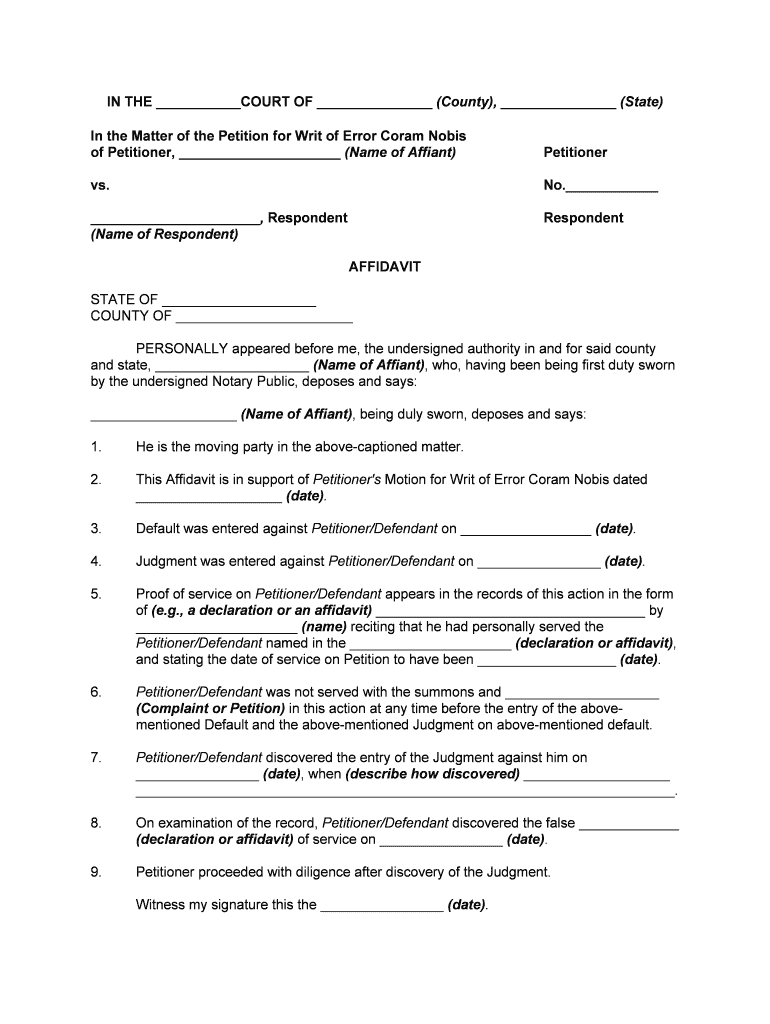
IN THE COURT OF (County), (State) In the Matter of the Petition for Writ of Error Coram Nobis of Petitioner, (Name of Affiant)Petitionervs.No. , Respondent (Name of Respondent)Respondent AFFIDAVITSTATE.

Open form follow the instructions

Easily sign the form with your finger

Send filled & signed form or save
How to fill out the Coram Nobis online
Completing the Coram Nobis form online can be straightforward if you follow a structured approach. This guide will provide you with comprehensive instructions to accurately fill out the form and ensure your concerns are properly addressed.
Follow the steps to effectively complete your Coram Nobis form.
- Click 'Get Form' button to obtain the form and open it in the editor.
- Begin with filling in the section titled 'IN THE ___________COURT OF _______________ (County), _______________ (State)'. Specify the relevant court details - include the county and state where your case is filed.
- Next, for the petition details, include the name of the petitioner where it says 'of Petitioner, _____________________ (Name of Affiant)'. This is typically your name or the name of the person who is filing the petition.
- Fill in the case number in the space indicated as 'No.____________'. If you do not have a case number, consider contacting the court for assistance.
- For the respondent, enter the name where it says '______________________ , Respondent'. This is the name of the opposing party in your case.
- Complete the Affidavit section by entering your name where indicated: 'STATE OF ____________________'. Next, fill in your state and county of residence.
- In the Affidavit, affirm your status by entering your name where it indicates 'PERSONALLY appeared before me...'. Follow by confirming your role as a moving party in the referenced case.
- Provide the date of your Motion for Writ of Error Coram Nobis in the statement beginning 'This Affidavit is in support of...'. Ensure accurate dates for any defaults or judgments that have been entered.
- Detail how you were served, including any documents you received and the names involved, filling in the relevant fields precisely. If you were not served, make that clear in section 6.
- Indicate the date you discovered the judgment against you and how you found out about it in statement 7. Be thorough yet concise in your explanation.
- Review all sections, especially the last statement regarding your actions upon discovering the judgment; make sure it is truthful and complete.
- Finally, review your entire form for completeness and accuracy. You can then save changes, download, print, or share the form as necessary.
Start completing your Coram Nobis document online today to ensure your legal voice is heard.
Experience a faster way to fill out and sign forms on the web. Access the most extensive library of templates available.
Related content
Dec 17, 2020 — In the instant petition for writ of error coram nobis, Petitioner again...
by EN Robinson · 1951 — In the United States, coram nobis is the name generally...
error coram nobis denied. PRESENT: SCUDDER, P.J., FAHEY, LINDLEY,. SCONIERS, AND...
Get answers to your most pressing questions about US Legal Forms API.
How do you pronounce coram nobis?
A writ emanating from an appellate court, demanding that a lower court convey the record of a case to the appellate court so that the record may be reviewed for alleged errors of law committed during a juridical proceeding.
What does the legal term coram nobis mean?
The term "coram nobis" is Latin for "before us" and the meaning of its full form, quae coram nobis resident, is "which [things] remain in our presence". ...
What is the term coram nobis mean?
The term "coram nobis" is Latin for "before us" and the meaning of its full form, quae coram nobis resident, is "which [things] remain in our presence". ...
What does Said mean in legal terms?
adj. a reference back to a thing that was previously mentioned or identified, popular in legal documents, as "the said driver drove said automobile in a negligent manner."
What is a writ of Audita Querela?
As uncommon as it is, audita querela is a common law writ allowing a judgment defendant to obtain relief from the consequences of the judgment based on a defense or discharge arising after the rendition of judgment that cannot otherwise be raised.
What is the meaning of Corum?
quorum Add to list Share. A quorum is not necessarily a majority of members of a group, but the minimum needed in order to conduct business. For example, if two members of a group are absent, there can still be a quorum, meaning the meeting can go on without them.
What does Coram mean in law?
The term coram is used in phrases that refer to the appearance of a person before another individual or a group. Coram non judice, "in the presence of a person not a judge," is a phrase that describes a proceeding brought before a court that lacks the jurisdiction to hear such a matter.
What is meant by coram judice?
: before a judge having jurisdiction.
How do you pronounce Coram?
Here are 4 tips that should help you perfect your pronunciation of 'coram': Break 'coram' down into sounds: [KAW] + [RUHM] - say it out loud and exaggerate the sounds until you can consistently produce them.
What is the meaning of coram non judice?
Coram non judice, Latin for "not before a judge", is a legal term typically used to indicate a legal proceeding that is outside the presence of a judge (or in the presence of a person who is not a judge), with improper venue, or without jurisdiction.
Use professional pre-built templates to fill in and sign documents online faster. Get access to thousands of forms.
If you believe that this page should be taken down, please follow our DMCA take down process here.