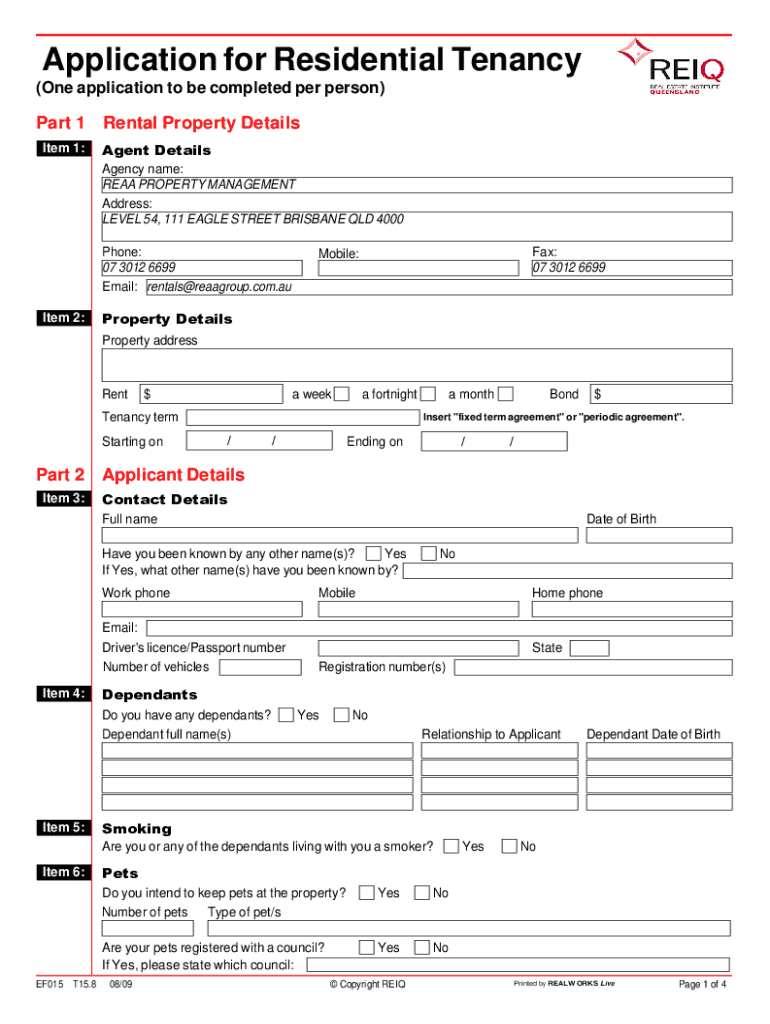
Application for Residential Tenancy (One application to be completed per person)Part 1 Rental Property Details Item 1:Agent Details Agency name: REAA PROPERTY MANAGEMENT Address: LEVEL 54, 111 EAGLE.

Open form follow the instructions

Easily sign the form with your finger

Send filled & signed form or save
How to fill out the Application For Residential Tenancy - Vision Property online
Completing the Application For Residential Tenancy online is a straightforward process that requires attention to detail. This guide will help you navigate each section of the form while ensuring that you provide all necessary information accurately.
Follow the steps to successfully complete your application.
- Click the ‘Get Form’ button to obtain the form and open it in your preferred editor.
- Begin with Part 1: Rental Property Details. Fill out the agent's details, including the agency name 'REAA PROPERTY MANAGEMENT', address, phone, and email. Next, enter the property details such as the property address, rent amount, tenancy term, and bond information.
- Move to Part 2: Applicant Details. Provide your full name, date of birth, and any other names you have been known by. For contact details, include your work phone, mobile, and email. Indicate your identification number, number of vehicles, and whether you have any dependents.
- Continue in Part 2 by answering questions about smoking and pets. State whether you intend to keep pets at the property, including the number and type of pets, and if they are registered with a council.
- Complete the applicants' address history. Provide your current and previous residential addresses, including occupancy details, the agent or lessor information, and reasons for leaving your previous residences.
- In Part 3, provide your employment details, including your employment status, occupation, income, and the name of your employer. If applicable, include your self-employment details or any Centrelink payments.
- Next, complete the student details, providing information about your education institution and status if you are studying full time.
- List personal references in Part 3, ensuring that you do not include relatives or other applicants. Provide their contact details.
- For supporting documents, in Part 4, ensure you meet the 100 point identification criterion and include necessary identification and income proof as specified in the form.
- Sign the declaration in Part 5, acknowledging the statements provided in the application. Include your name, signature, and date.
- Finally, review your application carefully for accuracy and completeness. Once satisfied, you can save your changes, download, or print the form for submission.
Complete your Application For Residential Tenancy online today to secure your next rental opportunity.
Experience a faster way to fill out and sign forms on the web. Access the most extensive library of templates available.
Related content
Apr 20, 2021 — King County Eviction Prevention and Rental Assistance Program ... How to...
] and the Tenant [tenant name] agree as follows: Property The landlord hereby leases to...
It would grant a "transit-rich housing bonus" to residential developments in such...
Get answers to your most pressing questions about US Legal Forms API.
How do I write an application for an apartment?
Introduce yourself to the real estate agent, property manager or landlord whoever is showing you the apartment. Have a brief conversation or ask a few questions about the apartment to help them get to know you and remember you. Dress nicely when you first meet the realtor or property manager.
How do I write a rental property letter?
Keep it short and only reference information relevant for an apartment application. If you are a landlord or property manager, outline your rental history and your experience with the tenant. ... Know what you can or cannot say. ... Be honest and accountable. ... Never lie. ... Keep emotions at bay. ... Keep it structured.
How do I write a rental application?
What should you write on a rental application letter? It's quite simple: Write a few short paragraphs about who you are, what you do for a living and perhaps the reason for your move. If you're applying as a group for a property you intend to share, briefly introduce each housemate.
Does TurboTenant do a credit check?
TurboTenant makes the entire rental process easy. Our free tenant credit checks integrate with our rental application, extensive screening report, online marketing, and renter management tools!
How do I make my rental application stand out?
Get organized before you start searching. ... Provide verifiable references. ... Submit a resume with your application. ... Address problems and offer solutions. ... Treat the inspection as an interview.
Can you get scammed on TurboTenant?
If you suspect or are aware that a rental listing posted on TurboTenant is a scam please click the Report Listing link on the listing page or email us the details at: badlisting@turbotenant.com.
How do I print a one form rental application?
Log in to 1form. Under the Sent section, click on the address of the application that you want to download/print. This will open your application in a new window. You can then download or print via the save and print options in your browser. If you are on mobile, you can take a screenshot.
Is TurboTenant free?
TurboTenant is easy and free software for landlords and property managers to market their rental properties, receive online rental applications, screen tenants and more.
How much is Turbotenant application?
TurboReport - $35 Application Fee.
What does on-site do?
On-Site.com provides a software-as-a-service platform that streamlines the process of renting an apartment, from listing to lease and everything in between including websites, advertising, lead management, online applications, background checks, payments and e-signatures.
Use professional pre-built templates to fill in and sign documents online faster. Get access to thousands of forms.
If you believe that this page should be taken down, please follow our DMCA take down process here.