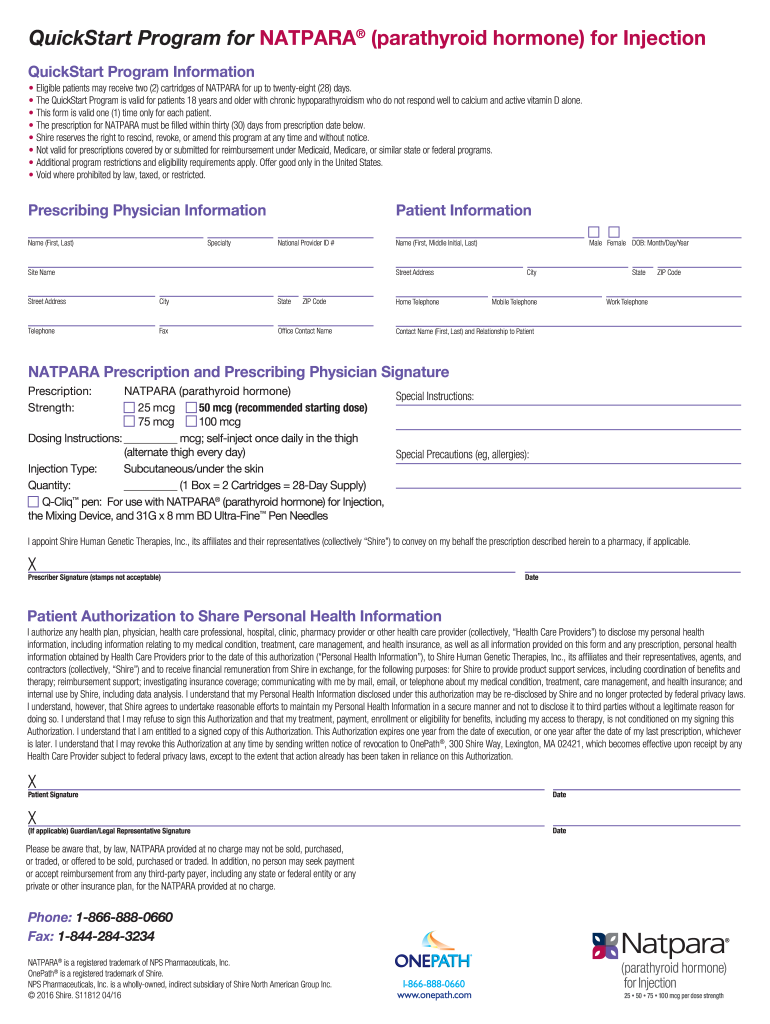
QuickStart Program for NATPARA (parathyroid hormone) for Injection QuickStart Program Information Eligible patients may receive two (2) cartridges of NATPARA for up to twentyeight (28) days. The QuickStart.

Open form follow the instructions

Easily sign the form with your finger

Send filled & signed form or save
How to fill out the Natpara Quick Start Form online
Filling out the Natpara Quick Start Form online is a straightforward process designed to facilitate access to treatment for eligible patients. This guide provides step-by-step instructions to help you complete the form accurately and efficiently.
Follow the steps to successfully complete the Natpara Quick Start Form.
- Use the ‘Get Form’ button to access the form and open it in your preferred editor.
- Enter the prescribing physician's information, including their name and specialty, ensuring all details are correct.
- Fill out the patient information section by providing the National Provider ID number, site name, street address, city, state, ZIP code, and telephone numbers. Include the patient's date of birth, designating male or female, and ensure accurate spelling of names.
- Complete the NATPARA prescription section by selecting the strength of the medication and providing dosing instructions. Specify the quantity requested and any necessary special instructions or precautions.
- The prescribing physician must sign the form at the designated space, ensuring not to use a stamp, and input the date of signing.
- In the patient authorization section, the patient needs to sign and include their guardian or legal representative's signature if applicable. Ensure the signature is complete and dated.
- Review all sections of the form for completeness and accuracy. Once satisfied, you can save changes, download, print, or share the form as necessary.
Complete your Natpara Quick Start Form online today for seamless processing.
Experience a faster way to fill out and sign forms on the web. Access the most extensive library of templates available.
Related content
calcium and active forms of vitamin D and for whom the potential benefits are ... When...
UNIVERSITY OF MICHIGAN – NATPARA® (parathyroid hormone). Some of ... the Michigan Prior...
is a form of parathyroid hormone consisting of the first (N-terminus) 34 amino acids...
Get answers to your most pressing questions about US Legal Forms API.
What are the side effects of NATPARA Injection?
The most common side effects of NATPARA include: tingling, tickling, or burning feeling of the skin, low or high blood calcium, headache, nausea, reduced sense of touch or sensation, diarrhea, vomiting, pain in joints, too much calcium in urine, and pain in limbs.
Why was NATPARA discontinued?
The Japan-based pharma has elected to nix all manufacturing of its Natpara injection for hypoparathyroidism in the U.S. and abroad by the end of 2024, a decision it credited to “unresolved supply issues that are specific to the product.” In the wake of that manufacturing halt, Takeda says it won't put Natpara back on ...
How much does NATPARA cost in USA?
The cost for Natpara subcutaneous powder for injection (25 mcg/dose) is around $10,452 for a supply of 2 powder for injection, depending on the pharmacy you visit. Quoted prices are for cash-paying customers and are not valid with insurance plans.
What class of drug is NATPARA?
Natpara belongs to a class of drugs called Parathyroid Hormone Analogs. It is not known if Natpara is safe and effective in children younger than 18 years of age.
How do you administer NATPARA?
NATPARA is available as an injection (shot). You will need to inject NATPARA once a day directly under the skin of the thigh. Be sure to inject a different thigh (alternate thigh) every day. A Nurse Educator will teach you how to properly prepare, administer and store your NATPARA when you start on therapy.
Is NATPARA FDA approved?
In January 2015, NATPARA was approved by the FDA.
Is NATPARA still recalled?
As a result, Takeda will not re-commercialize NATPARA in the U.S. and will discontinue manufacturing NATPAR globally. Until the end of 2024, Takeda's key priority is to maintain treatment continuity for patients who are currently receiving NATPAR/NATPARA, subject to available supply.
What is NATPARA used for?
NATPARA is a prescription parathyroid hormone used with calcium and vitamin D to control low blood calcium (hypocalcemia) in people with low parathyroid hormone blood levels (hypoparathyroidism).
Use professional pre-built templates to fill in and sign documents online faster. Get access to thousands of forms.
If you believe that this page should be taken down, please follow our DMCA take down process here.