Loading
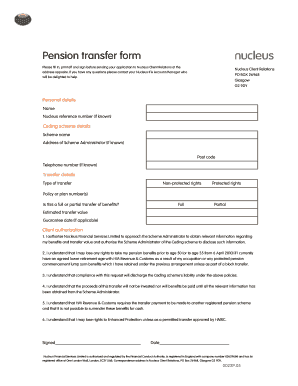
Get Pension Transfer Form - Nucleus Financial
How it works
-

Open form follow the instructions
-

Easily sign the form with your finger
-

Send filled & signed form or save
How to fill out the Pension Transfer Form - Nucleus Financial online
Completing the Pension Transfer Form - Nucleus Financial online is an important step in managing your pension. This guide will provide you with clear, actionable steps to ensure you fill out the form accurately and efficiently.
Follow the steps to complete the Pension Transfer Form with ease.
- Press the ‘Get Form’ button to access the Pension Transfer Form and open it in the designated editor.
- Begin by entering your personal details in the specified sections. Provide your full name and Nucleus reference number if available.
- Next, move to the ‘Ceding scheme details’ section. Here, input the name of the scheme and, if known, the address and postal code of the Scheme Administrator, including their telephone number.
- Proceed to the ‘Transfer details’ section. Specify the type of transfer by selecting either ‘Non-protected rights’ or ‘Protected rights’. You will also need to provide the policy or plan number(s) and indicate whether this is a full or partial transfer of benefits.
- Enter the estimated transfer value and, if applicable, the guarantee date.
- In the ‘Client authorisation’ section, carefully read the statements and ensure you understand the implications of your authorisation. Sign and date the form as required.
- Once all fields are filled out and verified, save your changes. You will have options to download, print, or share the completed form.
Complete your documents online to manage your pension effectively.
The Nucleus Pension account Our self-invested personal pension, with accumulation and drawdown options, allows you to create retirement planning propositions to suit your clients' needs.