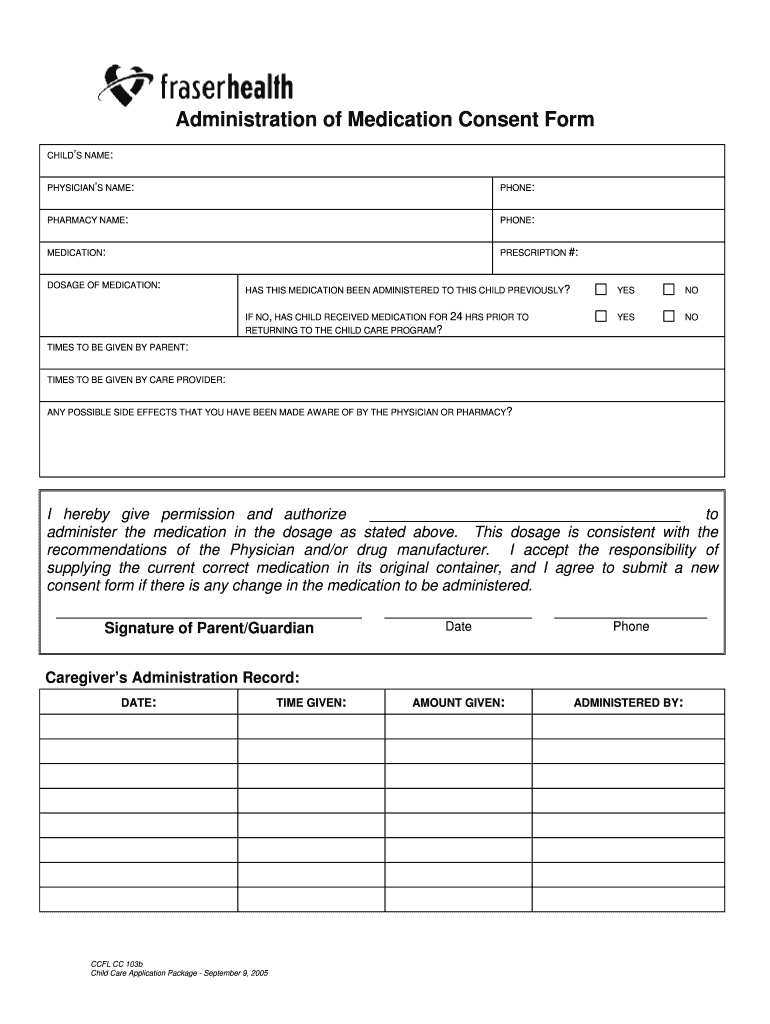
Administration of Medication Consent Form CHILDS NAME: PHYSICIANS NAME:PHONE:PHARMACY NAME:PHONE:MEDICATION:PRESCRIPTION #:DOSAGE OF MEDICATION:HAS THIS MEDICATION BEEN ADMINISTERED TO THIS CHILD.
Loading

Open form follow the instructions

Easily sign the form with your finger

Send filled & signed form or save
How to fill out the CCFL CC 103b - Administration Of Medication Consent Form - online
Filling out the CCFL CC 103b - Administration Of Medication Consent Form - online is a straightforward process that ensures your child receives their medication safely in a childcare setting. This guide will provide you with clear, step-by-step instructions for completing each section of the form.
Follow the steps to complete the form effectively.
- Click ‘Get Form’ button to access the form and open it in the online editor.
- Enter your child's name in the designated field. Ensure accuracy when typing the name to avoid any misunderstandings.
- In the physician’s name field, input the name of the medical professional prescribing the medication.
- Provide the physician's phone number for any necessary follow-up regarding the medication.
- Fill in the pharmacy name where the prescription can be filled, along with its phone number for contact.
- Detail the medication name prescribed for your child.
- Enter the prescription number associated with the medication to assist in identification.
- Specify the dosage of the medication as instructed by the physician.
- Indicate whether this medication has previously been administered to your child by selecting 'Yes' or 'No'.
- If 'No' is selected, confirm whether your child has received medication within the past 24 hours before returning to childcare.
- Outline the specific times the medication should be given by you (the parent) and those to be given by the care provider.
- Note any possible side effects that have been communicated to you by the physician or pharmacy.
- Authorize the individual who will administer the medication by signing your name in the designated area.
- Date the form to indicate when permission is granted.
- Provide your contact phone number for any further inquiries or clarifications.
- Record the amount of medication given and by whom it was administered in the 'Caregiver’s Administration Record' section.
- Finally, review all entered information for accuracy before saving or downloading the completed form.
Complete your CCFL CC 103b - Administration Of Medication Consent Form - online today for your child's safety.
Experience a faster way to fill out and sign forms on the web. Access the most extensive library of templates available.
Related content
Jun 1, 1992 — Chapter 661. Hospice Regulations [NEW). Chapter 605. Adult Day Care...
Additional Physical Form: Also available on microfilm from the University of ... Rights...
Use professional pre-built templates to fill in and sign documents online faster. Get access to thousands of forms.
If you believe that this page should be taken down, please follow our DMCA take down process here.