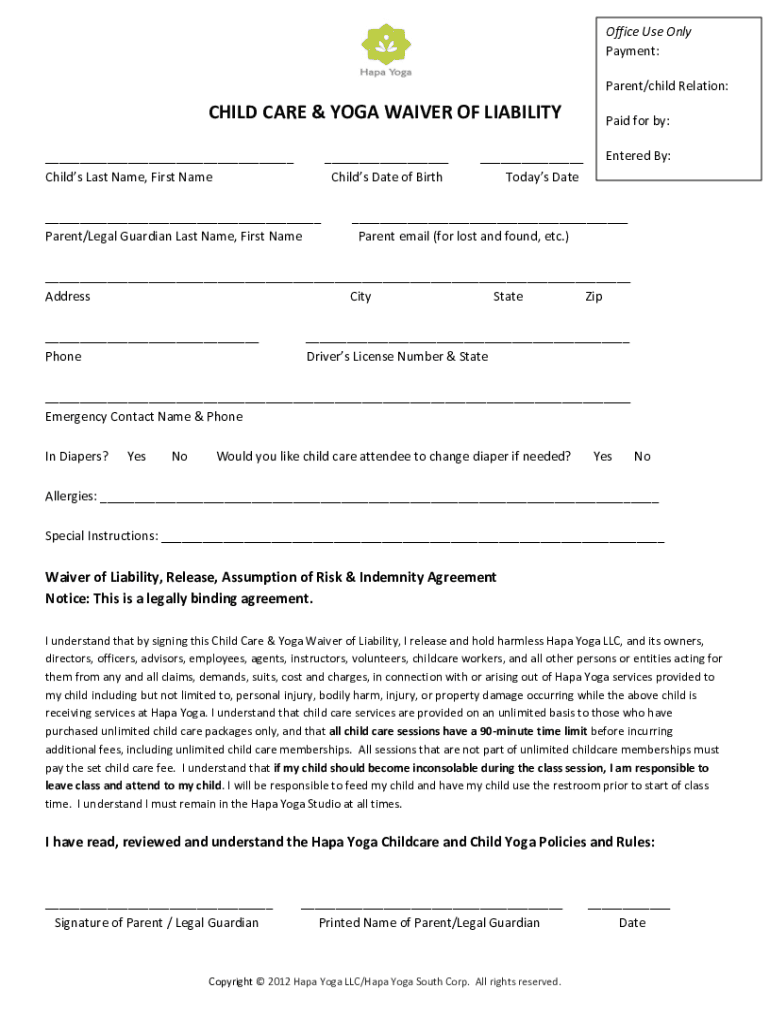
Office Use Only Payment: Parent/child Relation: CHILD CARE & YOGA WAIVER OF LIABILITY Childs Last Name, First Name Childs Date of Birth Parent/Legal Guardian Last Name, First Name Todays Date.

Open form follow the instructions

Easily sign the form with your finger

Send filled & signed form or save
How to fill out the Childcare Liability Waiver online
Completing the Childcare Liability Waiver online is a straightforward process designed to ensure the safety and well-being of your child during care services. This guide will provide you with clear, step-by-step instructions to help you fill out the waiver accurately and efficiently.
Follow the steps to complete the waiver successfully.
- Click ‘Get Form’ button to access the Childcare Liability Waiver. This will allow you to obtain the document and view it in the online editor.
- Fill in your child's last and first name in the appropriate fields. Be sure to enter this information accurately to avoid any discrepancies.
- Enter your child's date of birth in the designated field. This information is essential for verifying their age and ensuring eligibility for childcare services.
- In the next section, input your last and first name as the parent or legal guardian. This identifies you as the individual responsible for the waiver.
- Provide today's date where indicated. This acts as the official date of the waiver.
- Include your email address. This allows the facility to contact you regarding lost items or important notifications.
- Fill in your complete address, including city, state, and zip code. Accurate address information is necessary for registration and communication purposes.
- Enter your phone number in the specified field. This number will be used in case of emergencies or urgent communications regarding your child.
- Input your driver's license number and the state it was issued in. This information may be required for identification and verification.
- Provide an emergency contact name and phone number to be reached in case of an emergency involving your child.
- Indicate whether your child is in diapers by selecting 'Yes' or 'No.' This is important for the childcare staff to know.
- Confirm if you would like the childcare attendee to change your child's diaper if necessary by selecting 'Yes' or 'No.'
- List any allergies your child may have in the designated space provided. This is crucial for ensuring your child's safety during childcare.
- Include any special instructions for caring for your child in the corresponding field.
- Read the waiver of liability thoroughly. This is a legally binding agreement that releases the facility from certain liabilities. Once you've understood it, you will need to sign and print your name as the parent or legal guardian.
- Finally, review all the information you have entered for accuracy. Once confirmed, you can save changes, download the filled waiver, print it, or share it as needed.
Complete your waiver online today to ensure a smooth and safe experience for your child in childcare services.
Experience a faster way to fill out and sign forms on the web. Access the most extensive library of templates available.
Related content
Parent/Guardian Notice of No Liability. Insurance and Acknowledgment. (Only Complete this...
INFORMED CONSENT AND RELEASE FOR. OUR LITTLE VILLAGE|LIBRARY DROP-OFF CHILD CARE CENTER...
In partial response to questions from school (and child care) transportation offices...
Get answers to your most pressing questions about US Legal Forms API.
Do liability waivers protect you?
The most significant reason to use a liability waiver is that businesses can protect themselves from damages claims and lawsuits associated with inherently risky activities. This level of protection can shield your profitability and company reputation as well as avoid unnecessary legal disputes.
What is an example of a waiver?
A waiver is often required before you participate in something dangerous. If you decide to go skydiving, you might have to sign a waiver agreeing that you won't sue the skydiving company if you get injured. That means you're assuming all the risk associated with the activity.
How do I write a personal liability waiver?
How to Write a Liability Waiver or Release of Liability Form Your Liability Waiver Language Must Be Clear. ... Your Liability Waiver Language Must be Conspicuous. ... Your Liability Waiver Must Be Signed Voluntarily. ... Can You Sue After Signing a Waiver?
What is the wording for a liability waiver?
“The undersigned hereby assumes all risk of injury or harm as a result of the activities specified above and agrees to release, indemnify, defend, and forever discharge the releasee from all liability, claims, demands, damages, costs, expenses, and causes of action due to death, injury, loss, or damage to the ...
Use professional pre-built templates to fill in and sign documents online faster. Get access to thousands of forms.
If you believe that this page should be taken down, please follow our DMCA take down process here.