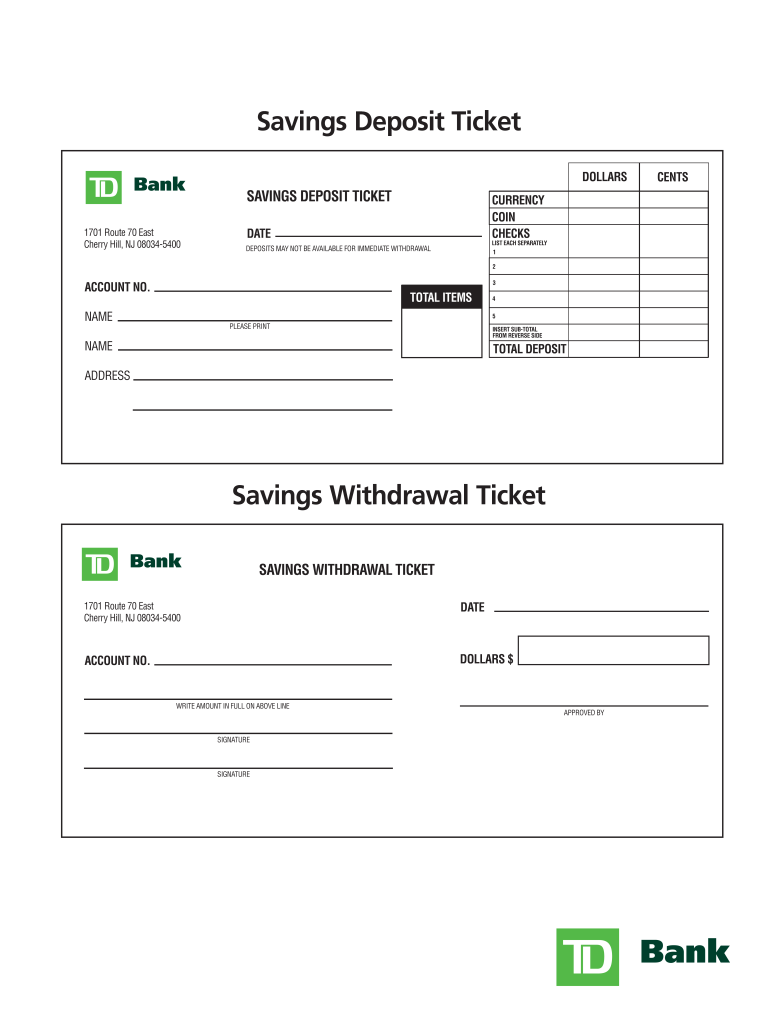
CHECKS DEPOSITS MAY NOT BE AVAILABLE FOR IMMEDIATE WITHDRAWAL LIST EACH SEPARATELY 1 2 3 ACCOUNT NO. TOTAL ITEMS NAME 4 5 PLEASE PRINT INSERT SUB-TOTAL FROM REVERSE SIDE NAME TOTAL DEPOSIT ADDRESS Savings Withdrawal Ticket SAVINGS WITHDRAWAL TICKET 1701 Route 70 East Cherry Hill, NJ 08034-5400 DATE ACCOUNT NO. DOLLARS $ WRITE AMOUNT IN FULL ON ABOVE LINE SIGNATURE SIGNATURE APPROVED BY CENTS .
Loading

Open form follow the instructions

Easily sign the form with your finger

Send filled & signed form or save
How to fill out the TD Bank Savings Deposit Ticket online
Filling out the TD Bank Savings Deposit Ticket online is a straightforward process that allows users to submit their deposits efficiently. This guide aims to provide clear instructions for each section of the ticket, ensuring that all users, regardless of their experience level, can complete the form accurately.
Follow the steps to complete your savings deposit ticket accurately
- Click ‘Get Form’ button to obtain the form and open it in your editor.
- Enter the date in the designated field at the top of the ticket. This should reflect the current date when you are making the deposit.
- In the 'Name' section, clearly print your full name as it appears on your TD Bank account.
- Fill in your address in the appropriate section. Ensure all information is current and correctly formatted.
- Input your account number in the designated area. This number can be found on your bank statements or account information.
- Detail your deposit items by listing each cash amount, coin count, and checks separately in the spaces provided. Make sure to include all relevant details.
- Calculate the total amount of your deposit and enter it in the 'Total Deposit' field. Double-check your calculations for accuracy.
- If applicable, provide any additional information requested on the reverse side of the ticket, particularly for deposits that may not be available for immediate withdrawal.
- Review all entries to ensure everything is filled out correctly and is legible.
- Once completed, you can save your changes, download, print, or share the form as required.
Complete your TD Bank Savings Deposit Ticket online today for a seamless banking experience.
Experience a faster way to fill out and sign forms on the web. Access the most extensive library of templates available.
Related content
Sep 23, 2013 — The SEC alleges that TD Bank and its then-regional vice president Frank...
by GG Bogert · 1930 · Cited by 33 — for that Association have prepared a uniform...
The Bank is entitled to refuse for deposit, encashment or collection certain items such as...
Get answers to your most pressing questions about US Legal Forms API.
Can I print a TD Bank deposit slip?
TD Bank does not support printing of deposit slips at home, as these slips are standardized forms that must be used for accurate processing. It’s best to obtain them directly from your local branch or during transactions with TD Bank representatives. Using the proper TD Bank Savings Deposit Ticket enhances your deposit accuracy.
Can I print my own deposit slips?
Printing your own TD Bank deposit slips is not recommended, as they are designed to meet specific banking standards. You should use the official slips provided by TD Bank to ensure correct processing. If you want to simplify your banking experience, consider using the TD Bank Savings Deposit Ticket for deposits.
What is the minimum amount to keep in a TD Bank savings account?
The minimum balance for a TD Bank savings account varies by account type, so it’s best to check the specifics through your online banking account or website. Generally, maintaining a specific balance can help you avoid monthly fees. Opening an account linked to a TD Bank Savings Deposit Ticket can simplify your savings management.
How do I get a TD Bank deposit slip?
To obtain a TD Bank deposit slip, visit your nearest branch or use your online banking account. You can also request a deposit slip during any teller transaction at the bank. Utilizing the TD Bank Savings Deposit Ticket ensures a smooth deposit process.
Can I print a direct deposit form from TD?
You cannot print a direct deposit form directly from TD Bank; however, you can easily request it through your online banking account. Simply log in, navigate to the forms section, and you'll find the necessary tools. If you encounter any issues, consider reviewing resources on the US Legal Forms platform for helpful templates.
How to fill out TD Bank deposit ticket?
To fill out a TD Bank deposit ticket, start by writing your name and account number clearly. Next, enter the total amount you are depositing, including any checks. After reviewing your entries for accuracy, sign the slip before submitting it to ensure your funds are credited properly to your account.
How do I get a savings deposit slip?
You can get a savings deposit slip by visiting a TD Bank branch, where the staff can assist you. Alternatively, you can download a TD Bank Savings Deposit Ticket from their website. Once you have the slip, you can fill it out for your next deposit.
Can I make my own deposit slips?
While it is possible to create your own deposit slips, it is generally recommended to use official TD Bank Savings Deposit Tickets. These tickets ensure that all necessary information is included and formatted correctly for processing. You can easily obtain these slips at any TD Bank branch or their online platform.
What is a savings account slip?
A savings account slip, also known as a deposit ticket, is a form used to record deposits made into a savings account. This slip includes details such as the account holder’s name, account number, and deposit amount. Using a TD Bank Savings Deposit Ticket ensures that your deposits are properly credited to your account.
Can I get a deposit slip online?
Absolutely, you can get a TD Bank deposit slip online. By accessing your TD Bank account via the online banking platform, you can find the option to create and print a savings deposit ticket. This convenient feature allows you to prepare your deposit in advance, minimizing your time spent at the bank.
Use professional pre-built templates to fill in and sign documents online faster. Get access to thousands of forms.
If you believe that this page should be taken down, please follow our DMCA take down process here.