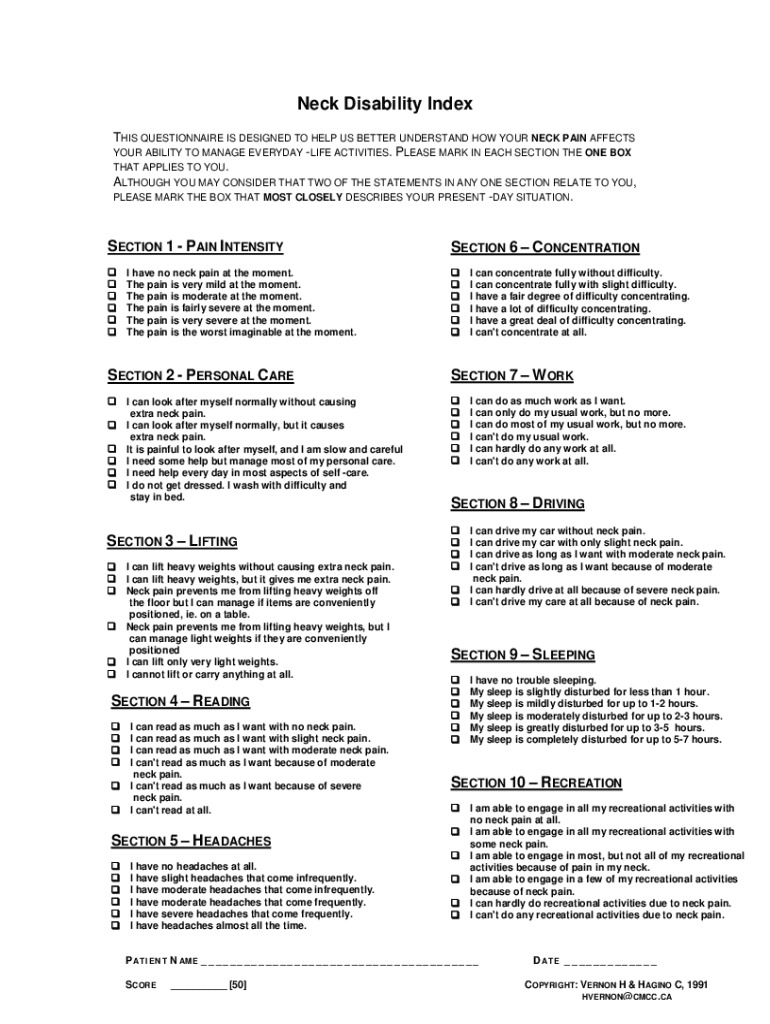
Neck Disability Index THIS QUESTIONNAIRE IS DESIGNED TO HELP US BETTER UNDERSTAND HOW YOUR NECK PAIN AFFECTS YOUR ABILITY TO MANAGE EVERYDAY -LIFE ACTIVITIES. PLEASE MARK IN EACH SECTION THE ONE BOX.
Loading

Open form follow the instructions

Easily sign the form with your finger

Send filled & signed form or save
How to fill out the Neck Disability Index คือ online
The Neck Disability Index คือ is a valuable tool for understanding how neck pain affects daily life activities. This guide will provide step-by-step instructions on completing the form online, ensuring clarity and ease of use.
Follow the steps to fill out the Neck Disability Index คือ effectively.
- Click the ‘Get Form’ button to obtain the form and open it in your preferred online editor.
- Begin with Section 1 - Pain Intensity. Select the option that best describes your current pain level by marking the box corresponding to your experience.
- Proceed to Section 2 - Personal Care. Assess your ability to manage personal care activities and choose the statement that closest reflects your situation.
- Move to Section 3 - Lifting. Indicate your lifting capabilities and neck pain experiences by selecting the appropriate box.
- Continue to Section 4 - Reading. Evaluate your ability to read and mark the option that accurately describes how neck pain affects this activity.
- In Section 5 - Headaches, select the statement that corresponds to your headache frequency and severity.
- Navigate to Section 6 - Concentration. Choose the option that best reflects your concentration ability in light of your neck pain.
- For Section 7 - Work, indicate your work capacity and any limitations caused by neck pain.
- Proceed to Section 8 - Driving. Assess how neck pain impacts your ability to drive and select the relevant option.
- In Section 9 - Sleeping, indicate how neck pain affects your sleep quality by marking the most accurate statement.
- Finally, complete Section 10 - Recreation. Choose the option that best describes your engagement in recreational activities due to neck pain.
- After filling out all sections, review your responses to ensure accuracy. Save your changes, then download or print the completed form for your records.
Complete the Neck Disability Index คือ online today to better understand your condition.
Experience a faster way to fill out and sign forms on the web. Access the most extensive library of templates available.
Related content
Oct 1, 2011 — The NDI-TH and NPDS-TH seem to be reliable instruments to measure...
Sources: Fairbank JCT & Pynsent, PB (2000) The Oswestry Disability Index. Spine...
Syringomyelia is a generic term referring to a disorder in which a cyst or cavity forms...
Get answers to your most pressing questions about US Legal Forms API.
How to unlock a Word document that is locked for editing by me?
0:24 3:50 How to fix a Word document locked for editing - YouTube YouTube Start of suggested clip End of suggested clip Then head over to protect and select restrict editing from the drop. Down. Now head down and hit theMoreThen head over to protect and select restrict editing from the drop. Down. Now head down and hit the stop protecting. Button if a password was added you'll need it to unlock the page.
How do you unlock a title in Word?
For example, click Edit in Microsoft Office Word. In the document, workbook, or presentation, right-click the label, and then click Unlock Label on the shortcut menu.
Why is my Word document locked by another user?
The file might be locked because: The file is shared and another user is currently editing it. An instance of the Office app is running in the background with the file already opened. The file has been marked as Final and can no longer be updated.
Why is my Word document locked?
The file might be locked because: The file is shared and another user is currently editing it. An instance of the Office app is running in the background with the file already opened. The file has been marked as Final and can no longer be updated.
How do you unlock a Word document that Cannot type?
In Word versions 2019 to 2010 and Microsoft 365, enter the password to unlock Word under "File" > "Protect Document" > "Restrict Editing" and then click "Stop Protection". In Word versions 2007 to 2003, enter the password in the menu via "Tools" > "Stop Protection".
How do you unlock a locked File?
Through the file explorer: Navigate to your working directory in the file explorer. Sort the folder so latest files are at the top. Delete all files that start with a dot or hash, or end in a . lck extension. Check all subdirectories to make sure every lock file is gone.
How do I unlock a Word document that is locked for editing by another user?
Resolution. To resolve this issue, first confirm that another user on the network does not have the document open. If the document is in use, open the document as read-only. If it is not in use, quit all instances of Word, and then remove the owner file.
How do you unlock a name in Word?
Point to the document, click the arrow that appears, and then click Edit in Microsoft Office program name. For example, click Edit in Microsoft Office Word. In the document, workbook, or presentation, right-click the label, and then click Unlock Label on the shortcut menu.
Use professional pre-built templates to fill in and sign documents online faster. Get access to thousands of forms.
If you believe that this page should be taken down, please follow our DMCA take down process here.