Loading
Get Prescription Request Form For Disposable Incontinence Products
How it works
-

Open form follow the instructions
-

Easily sign the form with your finger
-

Send filled & signed form or save
How to fill out the Prescription Request Form For Disposable Incontinence Products online
Filling out the prescription request form for disposable incontinence products online can be a straightforward process with the right guidance. This guide will provide you with clear, step-by-step instructions to ensure you complete the form accurately and efficiently.
Follow the steps to complete the online form.
- Click 'Get Form' button to obtain the form and open it in the editor.
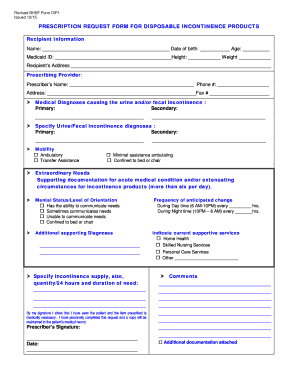
- Begin by entering the recipient information. Fill in the name, date of birth, age, Medicaid ID, height, and weight of the person requesting the products.
- Input the recipient's address accurately to ensure proper delivery.
- Provide the prescribing provider's information, including their name, phone number, address, and fax number.
- List the medical diagnoses causing the incontinence, including the primary and secondary diagnoses with corresponding ICD-9 CM codes.
- Specify the urine and/or fecal incontinence diagnoses, detailing both primary and secondary diagnoses along with their ICD-9 CM codes.
- Indicate the mobility status of the recipient by selecting the appropriate option from the provided choices.
- If requesting more than eight products per day, provide additional supporting documentation regarding the medical condition necessitating this increase.
- Describe the mental status and level of orientation, selecting the option that accurately reflects the recipient's ability to communicate their needs.
- List any additional supporting diagnoses, including the specific ICD-9 CM code.
- Indicate the frequency of anticipated changes for both daytime and nighttime usage.
- Specify the current supportive services the recipient is receiving, checking all that apply.
- List any medications or nutritional therapy that may increase urine or fecal output.
- Specify the incontinence supplies needed, including the type, size, quantity per day, and duration of need.
- The prescriber must sign the form, attesting to the medical necessity of the prescribed items.
- Finally, review the form for completeness, and proceed to save changes, download, print, or share the completed document as needed.
Complete your prescription request form online today to ensure timely access to essential products.
This license is required ONLY when a Call Queue or Auto Attendant has an inbound phone number. Nested Call Queues or Auto Attendants do not require a license because they don't have a publicly callable phone number assigned to them.