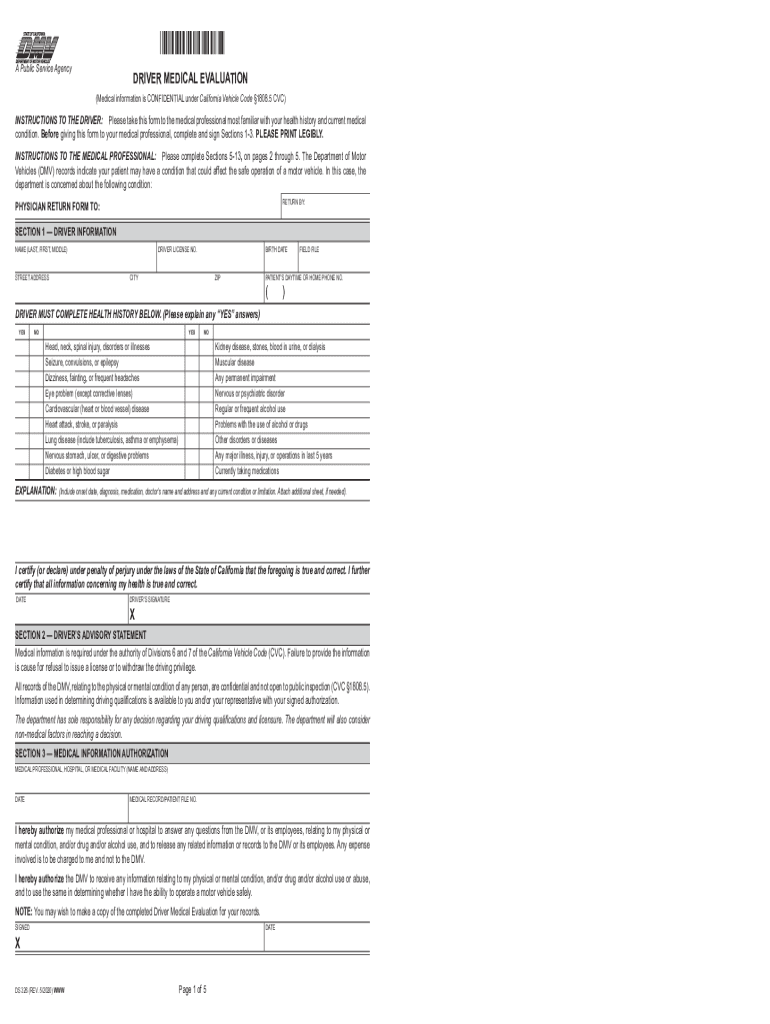
PHYSICIAN RETURN FORM TO: DRIVER MEDICAL EVALUATION A Public Service Agency (Medical information is CONFIDENTIAL under Section 1808.5 CVC) INSTRUCTIONS TO THE DRIVER: Please take this form to the.

Open form follow the instructions

Easily sign the form with your finger

Send filled & signed form or save
How to fill out the Dmv Medical Clearance Form online
Completing the Dmv Medical Clearance Form accurately is essential for ensuring your eligibility to drive safely. This guide will walk you through each section of the form, providing you with the necessary steps to complete it online with confidence.
Follow the steps to fill out the Dmv Medical Clearance Form online.
- Click ‘Get Form’ button to access the Dmv Medical Clearance Form and open it in your editor.
- Begin by filling out Section 1, which requires your personal information. Please print legibly your name, residential address, driver's license number, birth date, city, zip code, and daytime or home phone number.
- In Section 1, respond to all health history questions. Indicate 'yes' or 'no' for each condition listed, and provide explanations for any 'yes' answers in the designated area.
- In Section 2, read the advisory statement carefully and ensure you are aware of its implications regarding the information you have provided.
- Complete Section 3 by authorizing your medical professional or facility to release pertinent medical information to the Dmv. This section requires your medical professional's name and contact details.
- Once Section 1 through 3 is complete, review all your entries to ensure accuracy before signing and dating the form to certify the truthfulness of your responses.
- You will then need to provide the form to your medical professional, as Sections 5 through 13 must be completed by them. Ensure they fill out the required medical evaluations and comments.
- After your medical professional completes their sections, ensure you receive a copy of the fully completed form for your records.
- Finally, save any changes made to the form, then download, print, or share it as needed to submit to the appropriate Dmv office.
Complete your Dmv Medical Clearance Form online today to ensure your driving eligibility.
Experience a faster way to fill out and sign forms on the web. Access the most extensive library of templates available.
Related content
INSTRUCTIONS TO THE DRIVER: Please take this form to the medical ... is available to you...
... may also visit the Resources for the Older Driver website at dmv.ny.gov/olderdriver....
Complete this form to request that DMV re-evaluate a driver's ability to drive safely....
Get answers to your most pressing questions about US Legal Forms API.
How do I submit my dot medical card?
To submit your DOT medical card, first ensure it is completed by a certified medical examiner. You can send the DOT Medical Clearance Form to your state DMV via mail or deliver it in person at a local office. Check your specific state’s requirements for submission methods to ensure your medical card is processed efficiently.
Does NY DMV accept electronic documents?
Yes, the NY DMV does accept electronic documents for certain submissions, including the DOT Medical Clearance Form. You can upload your medical certificate online through the DMV portal, making the process more convenient. Always verify that the electronic submission meets the DMV's guidelines to ensure acceptance.
How does a doctor take away your driver's license?
A doctor can recommend to the DMV that your driver's license be revoked if they believe you have a medical condition that impairs your ability to drive safely. This usually involves completing the DOT Medical Clearance Form, which details any concerns about your health. The DMV will then review the information and make a decision regarding your driving privileges.
How do I submit my medical certificate to the DMV NY?
To submit your medical certificate to the DMV in New York, first, obtain the DOT Medical Clearance Form from your medical examiner. You can either mail this form to the DMV or bring it directly to a DMV office. It’s essential to ensure that the form is signed and dated to avoid any processing issues.
How to submit medical card to DMV NY?
In New York, you can submit your medical card by downloading the appropriate form from the DMV website. After completing the DOT Medical Clearance Form, you can send it via mail or submit it in person at your local DMV office. Make sure to keep a copy of the submitted form for your records, as it serves as proof of compliance.
How do you submit your dot medical card?
Submitting your DOT medical card involves ensuring that your medical certificate is filled out correctly by a certified medical examiner. After obtaining your DOT Medical Clearance Form, you can submit it to your state’s DMV either online, by mail, or in person. Always check your state’s specific submission requirements to ensure your card is processed without delays.
How do I submit a dot physical to the DMV NC?
To submit a DOT physical to the DMV in North Carolina, you need to complete the necessary forms provided by your medical examiner. Once you have your completed DOT Medical Clearance Form, you can either mail it directly to the DMV or deliver it in person at your local DMV office. This ensures that your medical information is officially recorded, allowing you to maintain compliance with state regulations.
Can you print a D4 medical form?
Yes, you can print a D4 medical form from various online sources, including the official DMV website or other legal document platforms. Ensure you access the correct version tailored to your state's requirements. After completing the form, you may need to submit it along with a Dmv Medical Clearance Form if applicable. U.S. Legal Forms can help you find the right documents and ensure compliance.
What medical condition keeps you from driving?
Certain medical conditions may restrict your ability to drive safely, such as severe epilepsy, vision impairments, or significant cardiovascular issues. If you have a condition that could affect your driving capabilities, you might need to submit a Dmv Medical Clearance Form to the DMV. It's crucial to stay informed about your health and its impact on driving. Consulting with a healthcare provider can provide clarity on what conditions may require this form.
How long can Arkansas suspend your license?
In Arkansas, a driver's license can be suspended for various reasons, including medical issues that require a Dmv Medical Clearance Form. The duration of the suspension can vary, typically lasting from 30 days to several months, depending on the severity of the situation. It's essential to address any medical concerns promptly to avoid prolonged suspension. For assistance, consider using U.S. Legal Forms to navigate the necessary documentation.
Use professional pre-built templates to fill in and sign documents online faster. Get access to thousands of forms.
If you believe that this page should be taken down, please follow our DMCA take down process here.