Male 4. The respondents details as stated on the contact order If there are more than 2 respondents please continue on a separate sheet. Respondent 1 Respondent s first name Middle name(s) Surname Date of birth D D / M M / Y Y Y Y Sex Male Address Postcode Relationship to the child(ren) Does the respondent have a solicitor acting for them? Name of child Yes Relationship No Don t know If Yes, please provide the details below. Respondent s solicitor Name of responden.
Loading

Open form follow the instructions

Easily sign the form with your finger

Send filled & signed form or save
How to fill out the C78 Form online
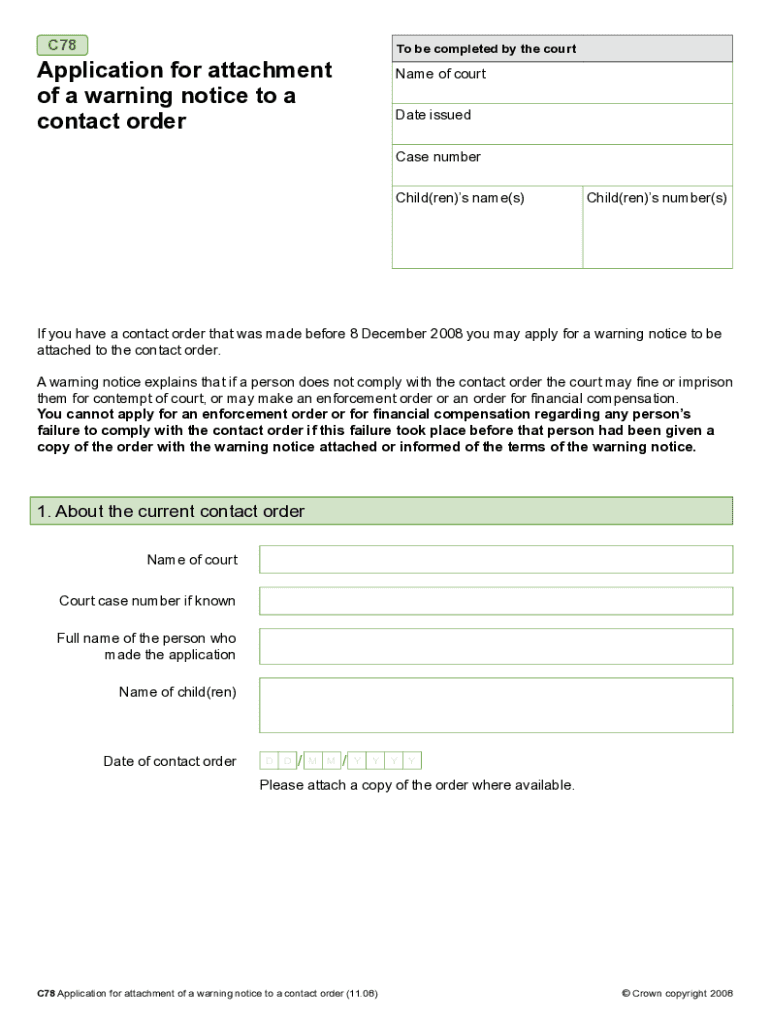
Completing the C78 Form online is an essential step for applying for a warning notice to be attached to a contact order. This guide provides clear, step-by-step instructions to ensure that you fill out the form accurately and efficiently.
Follow the steps to successfully complete the C78 Form.
- Click ‘Get Form’ button to access the C78 Form and open it in your preferred digital editor.
- Fill in the 'About the current contact order' section. Enter the name of the court, court case number if known, full name of the person who made the application, name(s) of the child(ren), and the date of the contact order.
- Complete the 'About you (the applicant)' section by providing your first name, middle name(s), surname, date of birth, sex, and contact information. If you prefer not to disclose your address, leave it blank and complete the Confidential Address Form C8.
- If there is a second applicant, fill out the 'Applicant 2 (if applicable)' section with their details, including name, date of birth, and relationship to the first applicant.
- In the 'The child(ren) in respect of whom the contact order was made' section, provide the details of each child involved in the order, including their names, dates of birth, and their relationship to the applicant.
- Complete the 'The respondents’ details as stated on the contact order' section. Enter the first and last names, dates of birth, sex, addresses, relationships to the child(ren), and details about any solicitors acting for the respondents.
- Address any current court cases concerning the child(ren) in the 'Current court cases which concern the child(ren)' section. If applicable, provide additional details about involved children.
- In the 'Signature' section, print your full name, sign, and date the application.
- If needed, indicate if an interpreter is required for attending court and specify any special arrangements or assistance needed.
- Review the checklist to ensure all parts of the form are completed and necessary documents are attached before submitting.
- Finally, save your changes, download the form, print it, or share it as needed.
Start completing the C78 Form online today to ensure your application is submitted correctly.
Experience a faster way to fill out and sign forms on the web. Access the most extensive library of templates available.
Related content
by Y Tobe · 2005 · Cited by 21 · Related articlesSize-selective formation of...
A form allowing access to any MPEC is at the bottom of this page. ... M.P.E.C. 2020-C78...
Form 7. C17-_. C27-_. C37-_. C47-_. C57-_. C67-_. C77-_. C87-_. —. —. Form 8. C18-4X-_...
Get answers to your most pressing questions about US Legal Forms API.
What do I do with a C79 form?
The C79 Form is used to request a variation of an existing court order. After completing the form, submit it to the court along with any supporting documents that justify your request. It's important to clearly articulate your reasons for the variation and how it serves the best interests of the child. For guidance on completing this form, USLegalForms offers valuable resources.
How to write a good position statement for family court?
To write a good position statement for family court, begin by clearly defining your goals and the rationale behind them. Use a logical structure that presents your arguments in a clear and straightforward manner. Incorporate relevant facts and evidence to strengthen your position. The C78 Form can serve as an excellent template for organizing your thoughts effectively.
What not to say to a family court judge?
When speaking to a family court judge, avoid making disparaging remarks about the other party or emotional outbursts. Focus on factual information and avoid personal attacks, as this can negatively impact your case. It's essential to maintain a respectful tone throughout the proceedings. Preparing a solid position statement using the C78 Form can help you stay on track.
What is a reasonable excuse to breach a child arrangement order?
A reasonable excuse to breach a child arrangement order may include circumstances such as the child's safety being at risk or a sudden illness. Each situation should be evaluated carefully, considering the best interests of the child. Documentation of any incidents or changes in circumstances is crucial for family court. Understanding how to navigate these issues can be enhanced through resources like the C78 Form.
How long should a position statement be for family court?
A position statement for family court should typically be concise, ideally one to two pages. This length allows you to express your points clearly without overwhelming the reader. Focus on the most relevant aspects of your case to stay within this length. Referencing the C78 Form can guide you in maintaining the appropriate length and format.
How to write a good position statement in family court?
Writing a good position statement in family court involves presenting your case logically and coherently. Clearly state your objectives and the reasons behind your stance, referencing relevant laws and guidelines. Make sure to keep your language straightforward and avoid emotional language that could cloud your argument. Utilizing the C78 Form can help structure your statement effectively.
What is a C78 form?
The C78 Form is a legal document used in family law cases, particularly in child arrangement disputes. This form allows parties to present their positions regarding child welfare and custody arrangements. Understanding the C78 Form is essential for anyone involved in family court proceedings, as it helps articulate your stance clearly. You can find resources to assist you with this form on platforms like USLegalForms.
How to write an effective position statement?
To write an effective position statement, start by clearly outlining your main points. Keep your statements concise and focused, ensuring each point directly relates to the case at hand. Use logical reasoning to support your claims, and provide evidence where applicable. Finally, conclude with a summary that reinforces your position, making sure to reference the C78 Form where necessary.
What can I do if my ex-partner breaks my court order?
If your ex-partner breaks a court order, you have several options to address the situation. You can document the breaches and communicate with your ex-partner to resolve the issue amicably. If necessary, you may need to file for enforcement in court, where the C78 Form can be relevant. Utilizing the resources available on USLegalForms can guide you through this process and help ensure your rights are protected.
What is a C78?
A C78 is a specific form used within the legal system, particularly concerning child arrangements and related matters. This form plays a crucial role in documenting agreements or disputes regarding child custody. Understanding the C78 Form is essential for anyone involved in child arrangement proceedings, as it helps to clarify expectations and responsibilities.
Use professional pre-built templates to fill in and sign documents online faster. Get access to thousands of forms.
If you believe that this page should be taken down, please follow our DMCA take down process here.