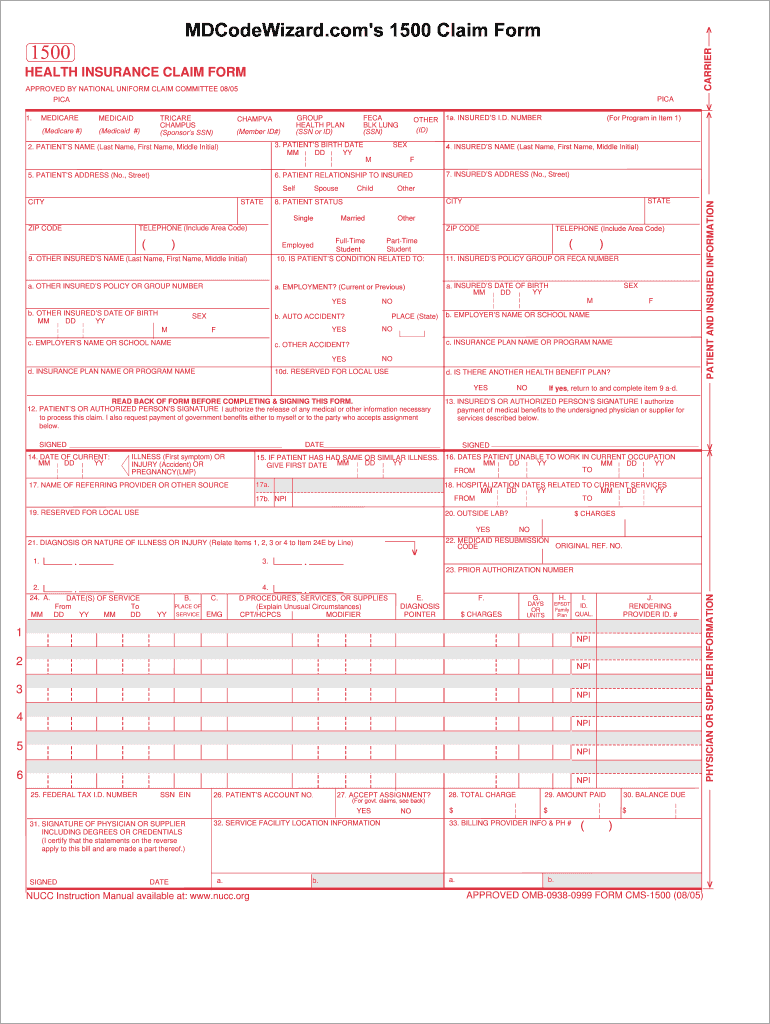
HEALTH INSURANCE CLAIM FORM APPROVED BY NATIONAL UNIFORM CLAIM COMMITTEE 08/05 PICA MEDICARE MEDICAID (Medicare #) 1. (Medicaid #) TRICARE CHAMPUS (Sponsor s SSN) PICA CHAMPVA GROUP HEALTH PLAN (SSN.

Open form follow the instructions

Easily sign the form with your finger

Send filled & signed form or save
How to fill out the CMS 1500 Claim Form - TRICARE Overseas online
Navigating the CMS 1500 Claim Form can be essential for ensuring proper reimbursement for medical services under TRICARE Overseas. This guide provides comprehensive, step-by-step instructions to aid users in successfully completing the form online.
Follow the steps to effectively complete the CMS 1500 Claim Form.
- Click ‘Get Form’ button to obtain the CMS 1500 Claim Form and open it in your preferred editor.
- In Section 1, identify the correct payer by marking the appropriate box for TRICARE and enter the relevant sponsor's Social Security Number.
- Enter the patient’s details in Sections 2 and 3, including their name, birth date, and address to ensure accurate information is submitted.
- In Section 6, outline the patient’s relationship to the insured by selecting from options like self, spouse, or child.
- Complete Section 10 by detailing whether the patient is involved in any other health benefit plans, including auto accidents, and employment status.
- Sections 12 and 13 require signatures from the patient and the insured. Ensure these are signed to authorize medical benefits and the release of medical information.
- Fill out Sections 17 to 24 with information regarding services provided, including hospitalizations, dates of service, procedures, and diagnoses in the appropriate fields.
- Finalize Sections 25 to 33 by providing the billing information, total charges, amount paid, and any additional necessary information.
- Once all fields are completed, review the entries for accuracy. You can then save your changes, download the completed form, print it, or share it as required.
Start completing your CMS 1500 Claim Form online today to ensure timely processing of your claims.
Experience a faster way to fill out and sign forms on the web. Access the most extensive library of templates available.
Related content
Sep 23, 2025 — In the U.S. and U.S. territories, you must file your claims within one...
... Claim Form, known as the CMS-1500, or Standard Claim Form. Hospitals may use the UB04...
This NUCC Reference Instruction Manual provides specific instructions on how to complete...
Get answers to your most pressing questions about US Legal Forms API.
How do I claim Tricare overseas?
To claim TRICARE overseas, fill out the CMS 1500 Claim Form - TRICARE Overseas with accurate service details. Ensure you gather necessary documents like receipts and invoices, then submit your claim through TRICARE’s designated channels. Using USLegalForms can simplify this process by providing a user-friendly interface.
Can you use TRICARE internationally?
Yes, you can use TRICARE internationally. While TRICARE Overseas provides coverage, you must comply with specific requirements, including submitting the CMS 1500 Claim Form - TRICARE Overseas for reimbursement. Always check the specific benefits available in your location to ensure proper coverage.
Can I file a TRICARE claim online?
Yes, you can file a TRICARE claim online. TRICARE provides an online portal where you can complete and submit the CMS 1500 Claim Form - TRICARE Overseas. This convenient option allows you to easily manage your claims and track their status.
Does Medicare accept the CMS 1500 claim form?
Yes, Medicare does accept the CMS 1500 Claim Form. This form is used for claiming various medical services, including those covered under TRICARE. If you are enrolled in both Medicare and TRICARE, it is essential to understand how billing works between the two to ensure you are reimbursed properly.
What is the timely filing limit for TRICARE overseas claims?
The timely filing limit for TRICARE overseas claims is typically one year from the date of service. It is important to complete and submit the CMS 1500 Claim Form - TRICARE Overseas promptly to avoid claim denials. Make sure to keep track of your filing dates to ensure your claims are accepted.
How to submit a TRICARE reimbursement?
You can submit a TRICARE reimbursement by filling out the CMS 1500 Claim Form - TRICARE Overseas. Ensure that you include all required documentation, such as receipts and invoices. Once your form is complete, send it to the appropriate claims processing location for TRICARE.
How to claim TRICARE overseas?
To claim TRICARE overseas, you must complete the CMS 1500 Claim Form - TRICARE Overseas. Begin by obtaining the form from the official TRICARE website or use a reliable platform like USLegalForms. After filling out the necessary information, submit your claim to the designated claims address provided by TRICARE.
Can I handwrite a CMS 1500 form?
Yes, you can handwrite a CMS 1500 claim form; however, it is recommended to type the information when possible. Handwriting can lead to legibility issues that may cause delays in processing your claim. If you do decide to write it out, ensure your handwriting is clear and neat, so that all information is easily readable. This attention to detail can support a smoother claims experience.
Is CMS 1500 paper or electronic?
The CMS 1500 claim form can be either paper-based or electronic. Providers have the option to submit paper forms if they prefer, but electronic claims submission is becoming increasingly common. Using electronic formats can speed up the claim process, reducing time for reimbursement. Ultimately, the choice depends on the provider's preference and capabilities.
Why are CMS 1500 claim forms printed in red ink?
CMS 1500 claim forms are printed in red ink to ensure that the form is properly scanned and processed by automated systems. The distinct coloring helps highlight essential data fields for efficient electronic processing. Using the proper format will reduce delays in claims handling. This standardization is crucial for the timely processing of the CMS 1500 claim form - TRICARE Overseas.
Use professional pre-built templates to fill in and sign documents online faster. Get access to thousands of forms.
If you believe that this page should be taken down, please follow our DMCA take down process here.