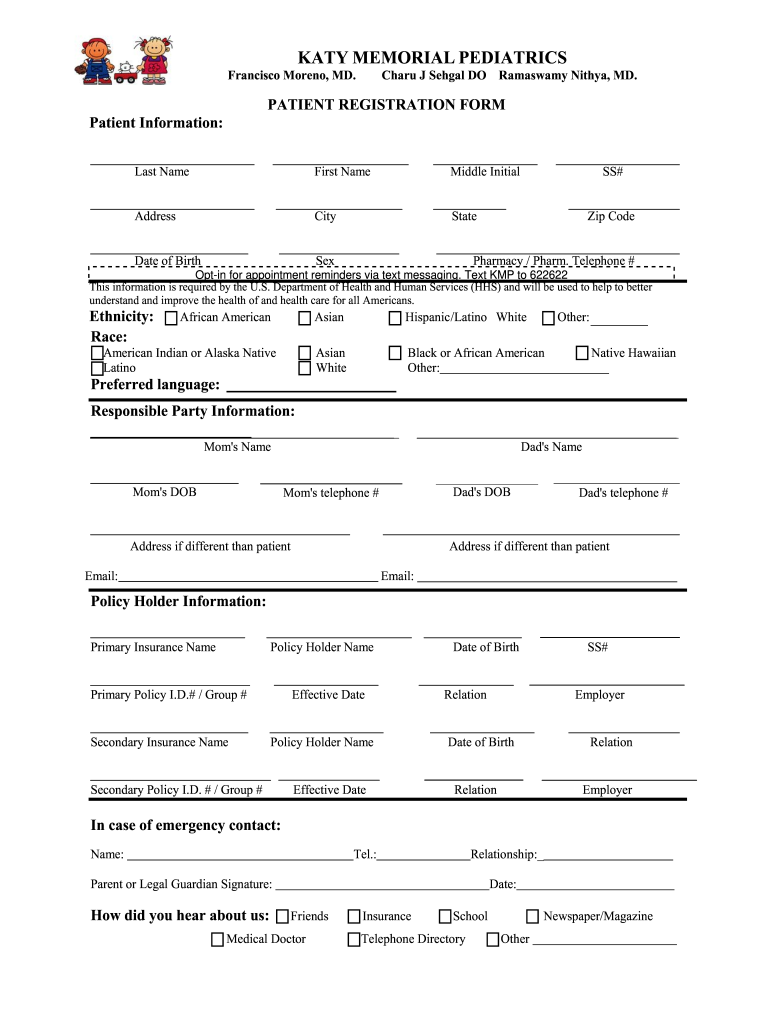
Dress City State Date of Birth Sex SS# Zip Code Pharmacy / Pharm. Telephone # Opt-in for appointment reminders via text messaging. Text KMP to 622622 This information is required by the U.S. Department of Health and Human Services (HHS) and will be used to help to better understand and improve the health of and health care for all Americans. Ethnicity: Race: African American American Indian or Alaska Native Latino Asian Hispanic/Latino White Other: Asian White B.
Loading

Open form follow the instructions

Easily sign the form with your finger

Send filled & signed form or save
How to fill out the Katy Memorial Pediatrics Patient Registration Form online
Filling out the Katy Memorial Pediatrics Patient Registration Form online is an essential step for new patients. This comprehensive guide provides clear instructions to ensure that you can complete the form accurately and efficiently.
Follow the steps to complete the registration form carefully.
- Press the ‘Get Form’ button to download the Katy Memorial Pediatrics Patient Registration Form and open it in your preferred document editor.
- Begin by entering the patient's information in the designated fields. Fill out the last name, first name, middle initial, address, city, state, zip code, date of birth, sex, and social security number.
- Continue by providing pharmacy details, including the pharmacy name and telephone number, as well as indicating your preference for appointment reminders via text messaging.
- Complete the ethnicity and race sections by selecting the appropriate options from the provided list, ensuring to choose 'Other' if applicable.
- In the Responsible Party Information section, fill in details for the primary caregivers of the patient, including names, dates of birth, telephone numbers, and addresses if they differ from the patient's address.
- Input the Primary Insurance information including the insurance name, policy holder's name, date of birth, social security number, policy ID, group number, effective date, relationship to the policy holder, and employer.
- If applicable, complete the Secondary Insurance information section with similar details as provided in the Primary Insurance section.
- Fill in the emergency contact information with the name, telephone number, and relationship to the patient.
- Sign the form as the parent or legal guardian, and date the document to confirm agreement with the information provided.
- Finally, save your changes to the form, and you have the option to download, print, or share the completed document as needed.
Complete your documents online for efficient processing today.
Experience a faster way to fill out and sign forms on the web. Access the most extensive library of templates available.
Related content
Jul 28, 2025 — Comprehensive Hospital Increase Reimbursement Program (CHIRP) for the...
New Patient Registration You should have received an invitation to sign up for the...
The PUDF contains patient-level information for inpatient hospital stays. These data are...
Use professional pre-built templates to fill in and sign documents online faster. Get access to thousands of forms.
If you believe that this page should be taken down, please follow our DMCA take down process here.