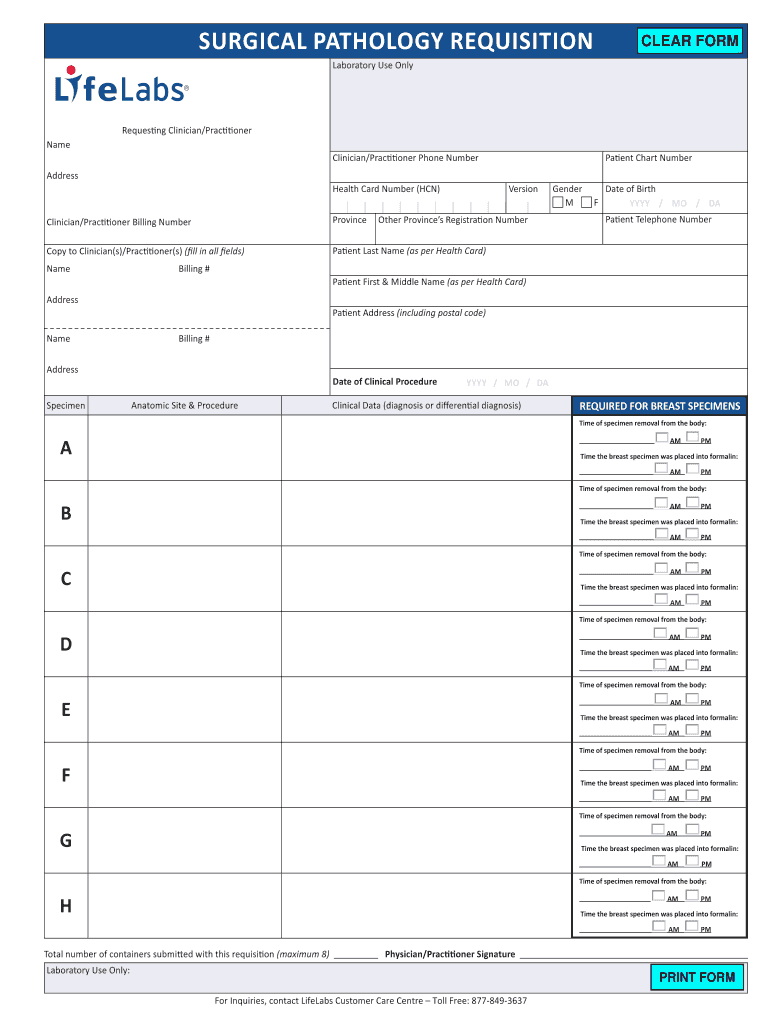
Ctitioner(s) (fill in all fields) Patient Last Name (as per Health Card) Billing # F Date of Birth YYYY / MO / dA Patient Telephone Number Patient Address (including postal code) Billing # Address Specimen Other Province s Registration Number Gender M Patient First & Middle Name (as per Health Card) Address Name Patient Chart Number Version Clinician/Practitioner Billing Number Name S89057 CLEAR FORM Anatomic Site & Procedure date of Clinical Procedure YYYY / MO / dA Clinical.
Loading

Open form follow the instructions

Easily sign the form with your finger

Send filled & signed form or save
How to fill out the Lifelabs Surgical Pathology Requisition Form online
Completing the Lifelabs Surgical Pathology Requisition Form online is essential for ensuring that your patient’s pathology needs are met accurately and efficiently. This guide provides detailed steps to help you fill out each section of the form with confidence.
Follow the steps to successfully complete the form.
- Click ‘Get Form’ button to obtain the form and open it for editing.
- Begin by entering the name of the requesting clinician or practitioner along with their phone number. Ensure that all details are accurate to facilitate communication.
- Fill in the address of the clinician or practitioner, followed by the patient's health card number and the province.
- If applicable, include the names of any clinicians or practitioners to whom a copy should be sent, ensuring all fields are filled out.
- Enter the patient’s last name as it appears on their health card, the patient's first and middle name, and their date of birth. Provide the patient's telephone number and address including postal code.
- Document the patient's billing number and chart number where indicated.
- Complete the anatomic site and procedure section, specifying the date of the clinical procedure.
- For breast specimens, record the times of specimen removal from the body in the designated fields and ensure this information is precise.
- Indicate the time the breast specimen was placed into formalin for each relevant specimen.
- Specify the total number of containers being submitted along with this requisition, up to a maximum of eight.
- Lastly, the physician or practitioner must provide their signature to validate the requisition.
- Once all sections have been completed, you can save changes, download, print, or share the form as required.
Complete your documents online to streamline the submission process.
Experience a faster way to fill out and sign forms on the web. Access the most extensive library of templates available.
Related content
Clinical testing is used for predisposition, screening, diagnosis, prognosis, monitoring...
Drawing upon a three and a half year long research project, this dissertation examines the...
Get answers to your most pressing questions about US Legal Forms API.
What is the email format for LifeLabs?
The email format for contacting LifeLabs generally follows the pattern of customer support or relevant department@lifelabs. You can use it to ask questions regarding the LifeLabs Surgical Pathology Requisition Form or any other inquiries. For faster assistance, consider using their customer support portal for specific issues. They are there to help you with your lab needs.
Does LifeLabs send a confirmation email?
Yes, LifeLabs typically sends a confirmation email after your requisition has been successfully received. This email serves as reassurance that your request is in the system and outlines any further steps you may need to take. Make sure to check your inbox for this confirmation and retain it for your records. It helps track the status of your testing.
How do I create a lab requisition form?
Creating a lab requisition form can be straightforward. Begin by gathering all necessary patient information, including personal details and the specific tests you want. Use a template or the LifeLabs Surgical Pathology Requisition Form available online to fill out the required fields. Once completed, ensure to review the form for accuracy before submission.
How to fill out a lab form?
Filling out a lab form requires attention to detail. Start by providing your personal information, including your name, date of birth, and contact details. Next, clearly indicate the tests required by checking the appropriate boxes on the LifeLabs Surgical Pathology Requisition Form. Lastly, ensure you sign the form to authorize the tests, and consult your healthcare provider for any guidance.
How do I send a requisition to LifeLabs?
You can send a requisition to LifeLabs by either visiting a local facility or using the secure online portal provided by LifeLabs. Make sure to have your completed LifeLabs Surgical Pathology Requisition Form ready. Alternatively, you can ask your healthcare provider to submit the requisition on your behalf. This streamlined process makes it easy to access the services you need.
Can you drink water when fasting for blood test LifeLabs?
When preparing for your blood test at LifeLabs, you can drink water while fasting. Staying hydrated is important, and it does not affect the results of the tests. However, avoid any food or other beverages, as these could interfere with your results. Always check with your healthcare provider if you have specific concerns.
What is a requisition form?
A requisition form is a document used to request medical services or tests, such as those outlined in the LifeLabs Surgical Pathology Requisition Form. This form facilitates communication between healthcare providers and laboratories, ensuring that the necessary information is conveyed efficiently. Understanding this document’s purpose can enhance the healthcare process.
What are the 7 steps of a requisition form?
The seven steps of a requisition form typically include identifying the patient, specifying the tests, documenting physician information, providing clinical history, indicating insurance details, signing the form, and submitting it. Each step is crucial for the processing of the LifeLabs Surgical Pathology Requisition Form. Following these steps meticulously will help clarify your needs for the lab.
What is an example of a requisition?
An example of a requisition is found in the LifeLabs Surgical Pathology Requisition Form, which details the types of tests ordered and patient information. This form is essential for ensuring accurate diagnosis and treatment planning. Each requisition serves as a formal request for laboratory testing services, aligning with clinical needs.
How to send a lab requisition to LifeLabs?
To send a lab requisition to LifeLabs, you can either use an online platform or submit a physical copy. If you’re using the LifeLabs Surgical Pathology Requisition Form, complete it accurately and send it via fax or mail as directed. Visit the LifeLabs website for detailed instructions tailored to your needs.
Use professional pre-built templates to fill in and sign documents online faster. Get access to thousands of forms.
If you believe that this page should be taken down, please follow our DMCA take down process here.