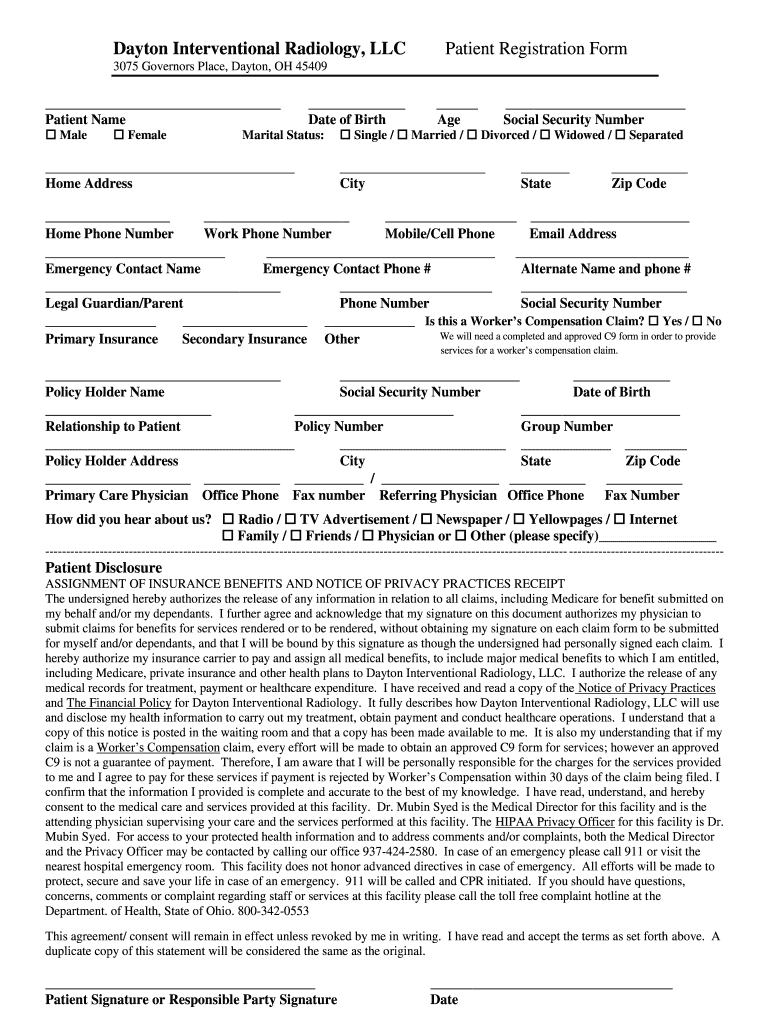
Rth Marital Status: Home Address Age Social Security Number Single / Married / Divorced / Widowed / Separated City State Zip Code Home Phone Number Work Phone Number Mobile/Cell Phone Email Address.
Loading

Open form follow the instructions

Easily sign the form with your finger

Send filled & signed form or save
How to fill out the Dayton Interventional Radiology Patient Registration Form Packet online
Completing the Dayton Interventional Radiology Patient Registration Form Packet online is a straightforward process designed to collect essential information for your medical care. This guide will provide you with step-by-step instructions to ensure that you fill out the form accurately and efficiently.
Follow the steps to successfully complete the patient registration form online.
- Click the ‘Get Form’ button to retrieve the registration form and open it in your editor.
- Begin by entering your full name in the 'Patient Name' field, and select your gender by checking either 'Male' or 'Female'.
- Input your date of birth in the designated area to verify your age, which is also requested later in the form.
- Provide your home address, including city, state, and zip code in the respective fields. Fill in your age and social security number accurately.
- Indicate your marital status by checking the appropriate box for 'Single', 'Married', 'Divorced', 'Widowed', or 'Separated'.
- Supply your contact numbers, including home, work, and mobile, alongside your email address.
- List an emergency contact's name and phone number, followed by any alternate contact information if necessary.
- If applicable, provide information about your legal guardian or parent, including their phone number and social security number.
- Answer the question regarding whether this is a worker’s compensation claim by checking 'Yes' or 'No'.
- Complete the insurance information section by providing details for your primary and secondary insurance, including policy holder's name, relationship to patient, policy number, and group number.
- Fill in the emergency contact's phone number and provide how you heard about the facility in the designated section.
- Read the patient disclosure section carefully and provide your consent by signing and dating the form at the bottom.
- After completing all sections, ensure that all inputted information is accurate before proceeding to save, download, print, or share the form as required.
Complete your registration form online to streamline your care process.
Experience a faster way to fill out and sign forms on the web. Access the most extensive library of templates available.
Related content
Jun 17, 2025 — Interventional Radiology, which uses minimally invasive procedures using...
A free online service provided by Logan University's Career Services for the posting of...
May 5, 2020 — The PHP procedure is performed in an interventional radiology suite in...
Get answers to your most pressing questions about US Legal Forms API.
How to fill a patient referral form?
Filling out a patient referral form requires specific information about the patient and the referring physician. Use the Dayton Interventional Radiology Patient Registration Form Packet to guide your entries. Ensure you include all necessary details such as patient demographics, medical history, and referral reasons. Carefully reviewing the completed form will help ensure accuracy and compliance.
How do I get people to fill out a form?
Getting people to fill out a form involves making it user-friendly and explaining the process. Highlight the importance of the Dayton Interventional Radiology Patient Registration Form Packet in improving their healthcare experience. Provide clear guidance on completion and make the form readily available. A personal touch, such as a follow-up reminder, can also boost participation rates.
How to get patients to fill out forms?
To encourage patients to fill out forms, simplify the process and communicate its importance. Emphasize how the Dayton Interventional Radiology Patient Registration Form Packet helps streamline their care. Consider offering assistance if patients have questions, and ensure forms are accessible both digitally and physically. Stressing the benefits of providing complete information will motivate patients to participate willingly.
What is a patient intake form?
A patient intake form is a document patients complete during their first visit, gathering essential information for their medical care. The Dayton Interventional Radiology Patient Registration Form Packet serves as an efficient tool for this. It collects data such as medical history and current medications, which helps healthcare providers tailor their services effectively. Proper intake forms enhance patient experiences and improve treatment outcomes.
How to create a form for people to fill out?
Creating a form for people to fill out begins with defining the information you need to collect. You can utilize the Dayton Interventional Radiology Patient Registration Form Packet as a template to streamline this process. Visit the US Legal Forms platform, where you'll find customizable options. Make sure to include clear instructions and ensure easy access to encourage completion.
What is the patient care after interventional radiology procedures?
Post-procedure care varies based on the specific intervention performed but often includes monitoring for any complications or discomfort. Patients generally receive detailed instructions on managing pain, activity levels, and follow-up appointments. Engaging with your healthcare team after the procedure is essential, and this information can usually be found in the materials accompanying the Dayton Interventional Radiology Patient Registration Form Packet.
What's the difference between a radiologist and an interventional radiologist?
While both radiologists and interventional radiologists specialize in imaging, the key difference lies in their practices. Radiologists primarily interpret medical images, while interventional radiologists perform procedures based on these images. Understanding these distinctions can help patients make informed decisions when seeking care, especially when completing the Dayton Interventional Radiology Patient Registration Form Packet.
What is the highest salary of interventional radiology?
The salary of an interventional radiologist can vary based on location, experience, and practice setting. Typically, experienced interventional radiologists earn among the highest salaries in the medical field, often exceeding $500,000 annually. Factors such as geographic demand and education may influence earnings, making this specialty an attractive option for aspiring medical professionals.
What is required for interventional radiology?
For interventional radiology, specific imaging studies and laboratory tests might be required prior to your procedure. Completing the Dayton Interventional Radiology Patient Registration Form Packet accurately ensures that your medical information is up to date and can facilitate efficient care. Prepare to discuss your medical history, current medications, and any allergies you may have.
What are the basics of interventional radiology?
Interventional radiology involves minimally invasive procedures guided by imaging techniques, such as X-rays and ultrasound. This specialty focuses on using catheters or tiny instruments to treat various conditions within the body. It offers significant benefits, including reduced recovery times and less discomfort, which is why understanding the Dayton Interventional Radiology Patient Registration Form Packet is useful for patients.
Use professional pre-built templates to fill in and sign documents online faster. Get access to thousands of forms.
If you believe that this page should be taken down, please follow our DMCA take down process here.