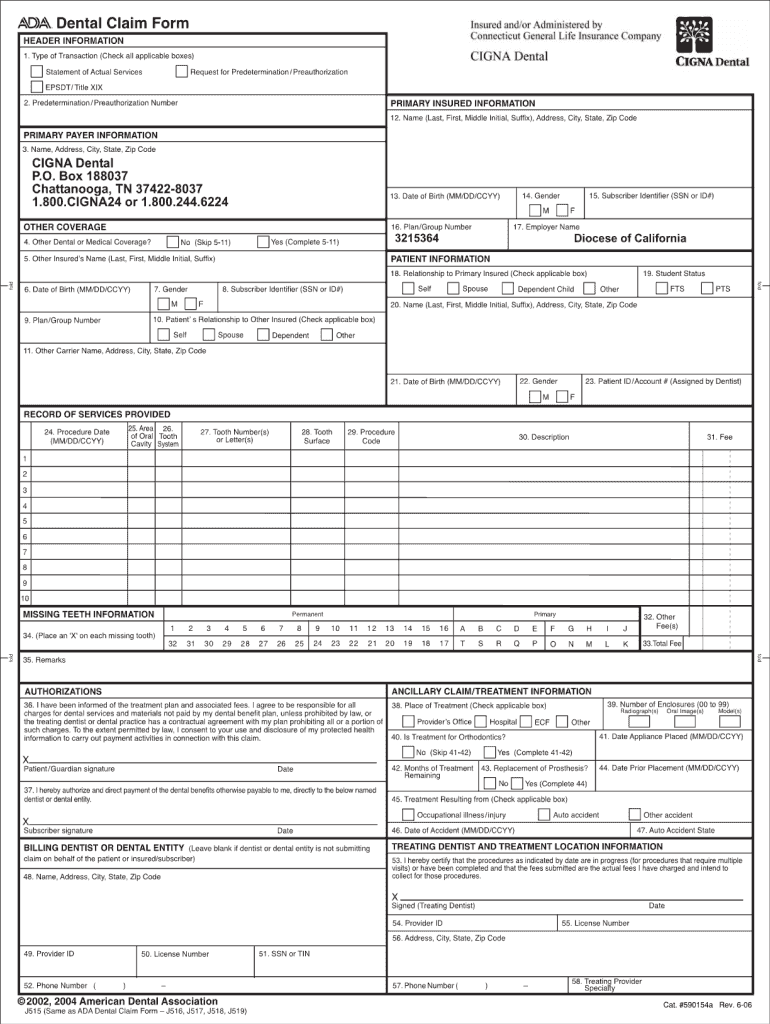
Dental Claim Form HEADER INFORMATION 1. Type of Transaction (Check all applicable boxes) Statement of Actual Services EPSDT/ Title XIX 2. Predetermination / Preauthorization Number Request for Predetermination.
Loading

Open form follow the instructions

Easily sign the form with your finger

Send filled & signed form or save
How to fill out the Cigna Dental Claims Address online
Filling out the Cigna Dental Claims Address form can seem daunting, but with the right guidance, it can be a straightforward process. This guide will walk you through each section of the form to ensure your dental claim is submitted accurately.
Follow the steps to complete your form successfully.
- Click ‘Get Form’ button to obtain the form and open it in the editor.
- Begin by entering your personal information. This includes your full name, address, phone number, and email. Ensure all details are accurate to avoid any processing delays.
- Next, provide your member ID number and group number. These numbers are crucial for identifying your dental plan and ensuring your claim is aligned with your coverage.
- Detail the services you are claiming. Clearly list any dental procedures, including the date of service and the name of the provider who performed the procedure.
- Attach any required documents, such as receipts or itemized bills, to support your claim. Make sure these are clear and legible to facilitate processing.
- Review all entered information for accuracy. It's vital to confirm that there are no mistakes, as this could result in delays or rejection of your claim.
- Once everything is complete, save your changes. You may then download, print, or share the completed form as needed.
Start completing your Cigna Dental Claims Address form online today to ensure your dental claim is processed without delay.
Experience a faster way to fill out and sign forms on the web. Access the most extensive library of templates available.
Related content
For mailing address, call Customer Service at the telephone number listed on your Cigna ID...
Mail your completed form to Cigna Dental, PO Box 188037, Chattanooga, TN 37422-8037. •...
Mar 19, 2021 — general release of claims in favor of Cigna and its affiliates and...
Get answers to your most pressing questions about US Legal Forms API.
What is the payer ID for Cigna in Chattanooga TN?
Just be sure that you are using the correct Payer ID – 62308.
What is the claims address for Cigna in TN?
CIGNA, 401 Chestnut St Ste 110, Chattanooga, TN, Insurance Group - MapQuest.
Is Cigna a PPO or HMO?
Our HMO and Network plans are offered by Cigna HealthCare of California, Inc. Our Point-of-Service plans are offered by Cigna HealthCare of California, Inc. (in-network), or Cigna Health and Life Insurance Company (out-of-network).
Can you fax dental claims to Cigna?
Cigna Dental Health of California, Inc. If you prefer, you can print and complete our Dental GRIEVANCE FORM: English [PDF] | Spanish [PDF] | Chinese [PDF] . Simply mail the form to the address above or fax it to 1 (866) 870-3842 .
What is the address of Cigna in USA?
Cigna's headquarters are located at 900 Cottage Grove Rd, Bloomfield, Connecticut, 06002, United States What is Cigna's phone number?
What is the payer ID for Cigna Dental Claims?
Yes. Dental offices can electronically submit all claims and encounters at the same time. Just be sure that you are using the correct Payer ID – 62308.
What is the claims address for Cigna in Chattanooga TN?
CIGNA, 401 Chestnut St Ste 110, Chattanooga, TN, Insurance Group - MapQuest.
Does Cigna send claims by mail?
Submitting medical, dental, and behavioral claims electronically can help you save time, money, and improve claim processing accuracy. Using one of Cigna's electronic data interchange (EDI) options allows you to send, view, and track claims – no faxing, printing, or mailing.
Use professional pre-built templates to fill in and sign documents online faster. Get access to thousands of forms.
If you believe that this page should be taken down, please follow our DMCA take down process here.