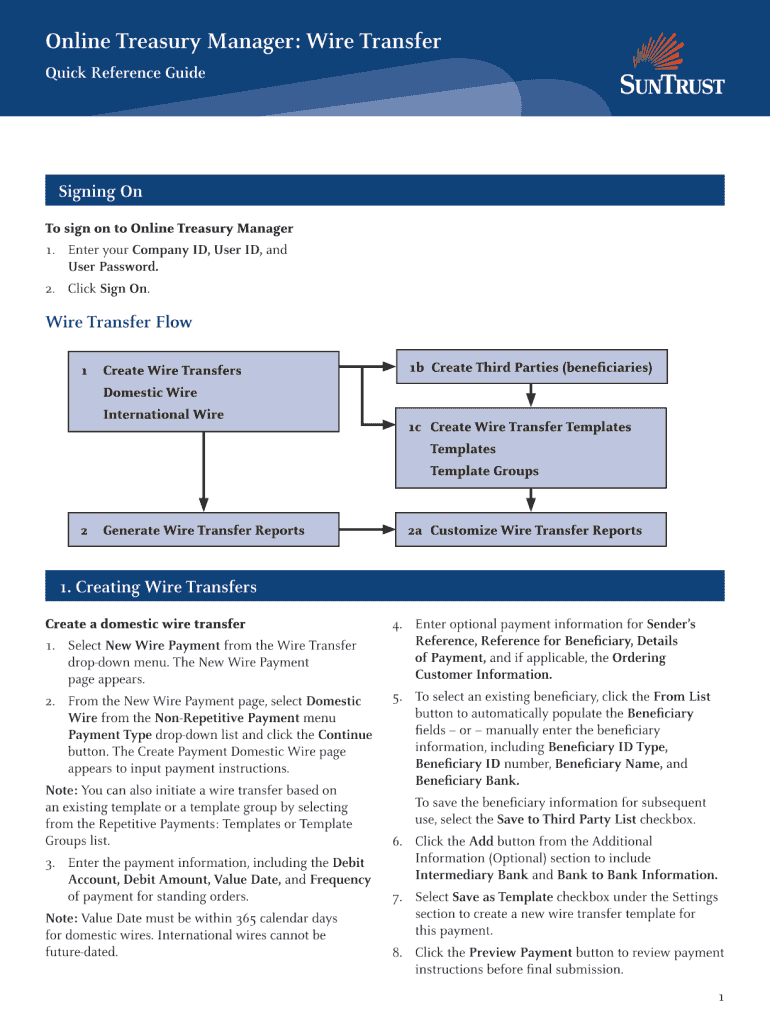
Online Treasury Manager: Wire Transfer Quick Reference Guide Signing On To sign on to Online Treasury Manager 1. Enter your Company ID, User ID, and User Password. 2. Click Sign On. Wire Transfer.

Open form follow the instructions

Easily sign the form with your finger

Send filled & signed form or save
How to fill out the Truist Bank Incoming Wire Instructions online
Filling out the Truist Bank Incoming Wire Instructions is a straightforward process that ensures your wire transfers are processed efficiently. This guide will walk you through each section of the form to help you complete it accurately.
Follow the steps to fill out the form correctly
- Click ‘Get Form’ button to obtain the form and open it in the editor.
- Begin by entering the sender's name as it appears on their bank account. This information is crucial for ensuring proper identification.
- Next, provide the sender's bank account number. Make sure to double-check this number to avoid any processing delays.
- Enter the sender's bank name accurately. This helps in correlating the transaction and ensuring it is directed to the right financial institution.
- Fill in the routing number for the sender's bank. It is a nine-digit number that uniquely identifies the bank in the United States.
- Complete the fields for the recipient’s information, including their name and account details, ensuring all entries are precise.
- Specify the total amount of the wire transfer, making sure to list the currency and any relevant notes regarding the transaction.
- Review all the entered information for accuracy. This step is vital to avoid any issues with processing the wire transfer.
- Once satisfied with the form, you can save changes, download, print, or share the form as needed for your records.
Complete your Truist Bank Incoming Wire Instructions online today for a seamless transfer experience.
Experience a faster way to fill out and sign forms on the web. Access the most extensive library of templates available.
Related content
This article delves into the detailed instructions for incoming wire transfers to Truist...
Oct 7, 2025 — This article delves into the detailed instructions for incoming wire...
Get answers to your most pressing questions about US Legal Forms API.
How do I receive an incoming wire transfer?
Receiving an incoming wire transfer at Truist Bank is a straightforward process. Start by providing the sender with your bank account details, including the routing number and SWIFT code if it's international. Make sure you follow the Truist Bank Incoming Wire Instructions, which guide you through the initial steps and ensure a timely and secure transfer.
When receiving a wire transfer, what information is needed?
When receiving a wire transfer through Truist Bank, you need to furnish your account number, routing number, and, if it's international, the SWIFT code. This information is vital for directing the wire to your account accurately. For complete and accurate details, refer to the Truist Bank Incoming Wire Instructions.
What information is needed for an incoming wire transfer?
To receive an incoming wire transfer at Truist Bank, you will need to provide specific information. This includes your account number, the bank's routing number, and the SWIFT code for international wires. Following the Truist Bank Incoming Wire Instructions will help ensure you provide all the necessary details for a successful transfer.
Can I receive a wire transfer with Truist Bank?
Absolutely, you can receive wire transfers with Truist Bank. This service allows you to get funds quickly and securely from both domestic and international sources. Make sure to follow the Truist Bank Incoming Wire Instructions to ensure a smooth transaction.
Does Truist Bank have a SWIFT code for wire transfer?
Yes, Truist Bank has a specific SWIFT code that you must use for all international wire transfers. This code is essential for accurately directing funds to your account. For the most current SWIFT code, check the Truist Bank Incoming Wire Instructions or speak with a representative for assistance.
What information is needed for a wire transfer Truist?
For a wire transfer to Truist Bank, you need to collect specific information. This includes your account number, the routing number, and if applicable, the swift code. It is vital to adhere to the Truist Bank Incoming Wire Instructions to ensure the transaction is processed promptly and accurately.
How to receive an incoming wire transfer?
To receive an incoming wire transfer at Truist Bank, you need to provide the sender with your bank account details, including your account number and Truist Bank's routing number. Additionally, it's helpful to share Truist's swift code for international transfers. Following the Truist Bank Incoming Wire Instructions will ensure that the funds are deposited into your account without issues.
What information do I need to give for a wire transfer?
To successfully execute a wire transfer, you must provide specific information about both the sender and the recipient. This generally includes the sender's name, address, and bank details, along with the recipient's name, address, account number, and routing number. Always refer to the Truist Bank Incoming Wire Instructions for any unique requirements.
What bank details do I need for a wire transfer?
When performing a wire transfer, you will need several critical bank details. These include the recipient's name, account number, the bank's routing number, and any additional information outlined in the Truist Bank Incoming Wire Instructions. Properly gathering and providing these details will help facilitate a successful transfer.
What is Truist Bank's address for wire transfer?
The address for wire transfers to Truist Bank can vary based on the specific branch you are working with. Typically, the address will be included in the Truist Bank Incoming Wire Instructions or can be obtained by contacting customer service directly. Ensure that you include the complete address to avoid any delays in processing your wire transfer.
Use professional pre-built templates to fill in and sign documents online faster. Get access to thousands of forms.
If you believe that this page should be taken down, please follow our DMCA take down process here.