Loading

Open form follow the instructions

Easily sign the form with your finger

Send filled & signed form or save
How to fill out the National Grid Pay Bill online
This guide provides clear and detailed instructions on how to fill out the National Grid Pay Bill online. It is designed to assist users in navigating each section of the form with ease, ensuring a smooth payment process.
Follow the steps to complete your National Grid Pay Bill online.
- Click ‘Get Form’ button to obtain the form and open it in the editor.
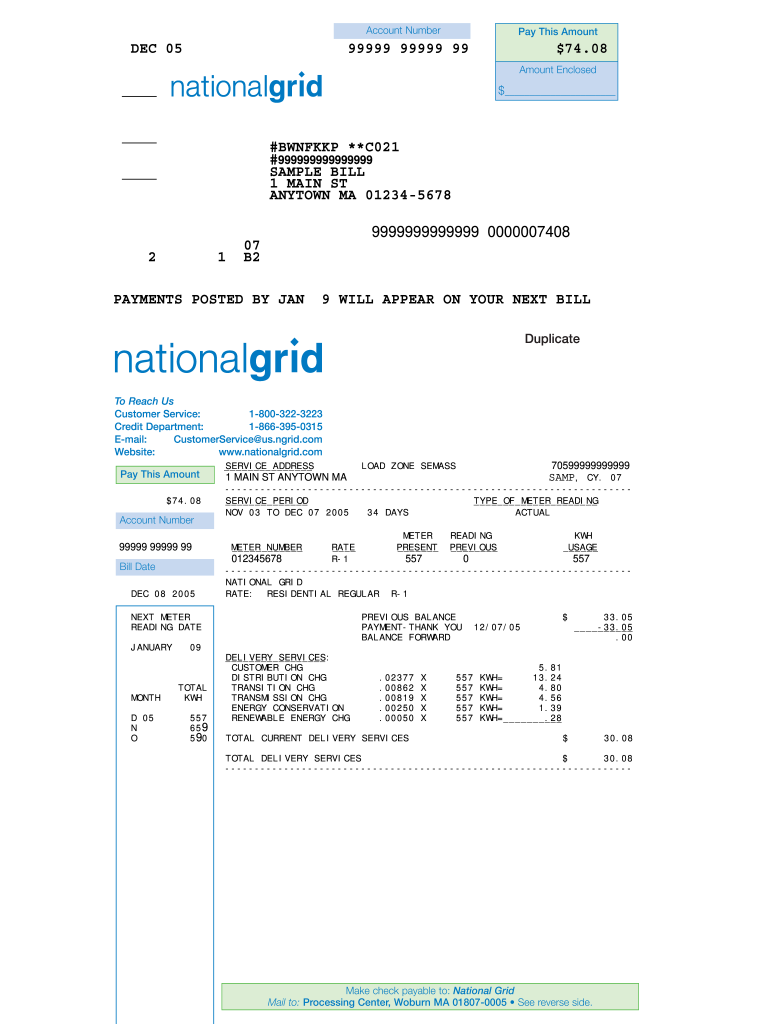
- Locate your account number on the bill. It is essential to ensure accuracy as this will be used for processing your payment.
- Identify the amount to pay. This is listed under 'Pay This Amount.' Confirm this figure matches your intended payment.
- In the ‘Amount Enclosed’ section, enter the specific amount you are sending if it differs from the total due.
- Review the bill date and service address fields to ensure they accurately reflect your details.
- Confirm the meter readings, if applicable, which are listed as present and previous. Make sure they align with your records if you are disputing any charges.
- Look through the delivery services charges breakdown to understand the components contributing to your bill total.
- Upon reviewing all the fields and ensuring all entries are correct, you can save changes, download, print, or share the form as needed.
Complete your National Grid Pay Bill online today to ensure timely processing!
Experience a faster way to fill out and sign forms on the web. Access the most extensive library of templates available.
Related content
Grants may be available to help you pay your bills through the Home Energy Assistance...
Welcome to the California Independent System Operator (ISO). We manage the flow of...
You can pay by Direct Debit directly from your bank or building society account. We'll...
Get answers to your most pressing questions about US Legal Forms API.
How to set up a bill paying system?
Setting up a bill paying system for your National Grid Pay Bill is straightforward. First, visit the National Grid website and create an online account if you haven’t done so already. Next, add your payment information and set your preferred payment method. By using uslegalforms, you can streamline the process, ensuring timely payments and helping you save time on your monthly utility expenses.
What is a speedpay payment?
Speedpay is a convenient service that allows you to make your National Grid Pay Bill quickly and securely. With Speedpay, you can pay your bill using a credit or debit card, ensuring that your payment processes without delay. This option is particularly useful when you are short on time and need to confirm your payment quickly. It simplifies your experience with National Grid, giving you peace of mind.
What is the phone number for National Grid Boston Gas?
To pay your National Grid bill or for assistance with Boston Gas, you can reach customer service at 1-800-322-3223. They provide support for various inquiries, including billing questions, service setups, and payment options. When contacting them, you can have your account details ready to ensure a smooth conversation. This way, you can quickly address any issues related to your National Grid Pay Bill.
How to do payment through phone?
To make a payment through phone, simply call the designated National Grid customer service number. A representative will guide you through the process to National Grid Pay Bill quickly and securely. Make sure to have your account details handy to ensure a smooth transaction. This option provides a convenient way to manage your payment when you are on the go.
What runs up my electric bill the most?
Many factors can contribute to a higher electric bill, but major appliances often make the biggest impact. Items such as air conditioners, water heaters, and refrigerators consume significant energy. Lighting can also add to costs, especially if you are using traditional bulbs instead of energy-efficient ones. To better manage your costs, consider reviewing your energy usage with tools or platforms that can help you understand how to National Grid Pay Bill effectively.
How do I pay my power bill?
Dial *977# or use PayBill number 888 888 to pay now...it is instant, convenient, and secure!
How do I pay my National Grid Ma by phone?
Customers who choose to pay via credit and debit card can do so instantly by calling 1-888-849-4310 or by visiting the National Grid web site at .nationalgridus.com No pre-registration or setup is necessary to use Western Union Speedpay.
How do I pay my Georgia Power bill?
You may submit your payment directly to Georgia Power Company by phone 24 hours a day, seven days a week by calling 1‑888‑660‑5890. Authenticate your account and enter your bank account and routing number to pay using your checking or savings account.
What is bill pay online?
Online bill pay enables you to view, schedule and pay your bills right from your computer, tablet or mobile phone. Online bill pay works by deducting a payment from your account balance and transferring it to a service provider.
How much is Alabama Power late fee?
If you're paying before 5:00 p.m., the fee is $50. If you're paying between 5:00 pm and 7:00 pm, the fee is $75. Payments made prior to 7:00 pm will be reconnected the same day.
Use professional pre-built templates to fill in and sign documents online faster. Get access to thousands of forms.
If you believe that this page should be taken down, please follow our DMCA take down process here.