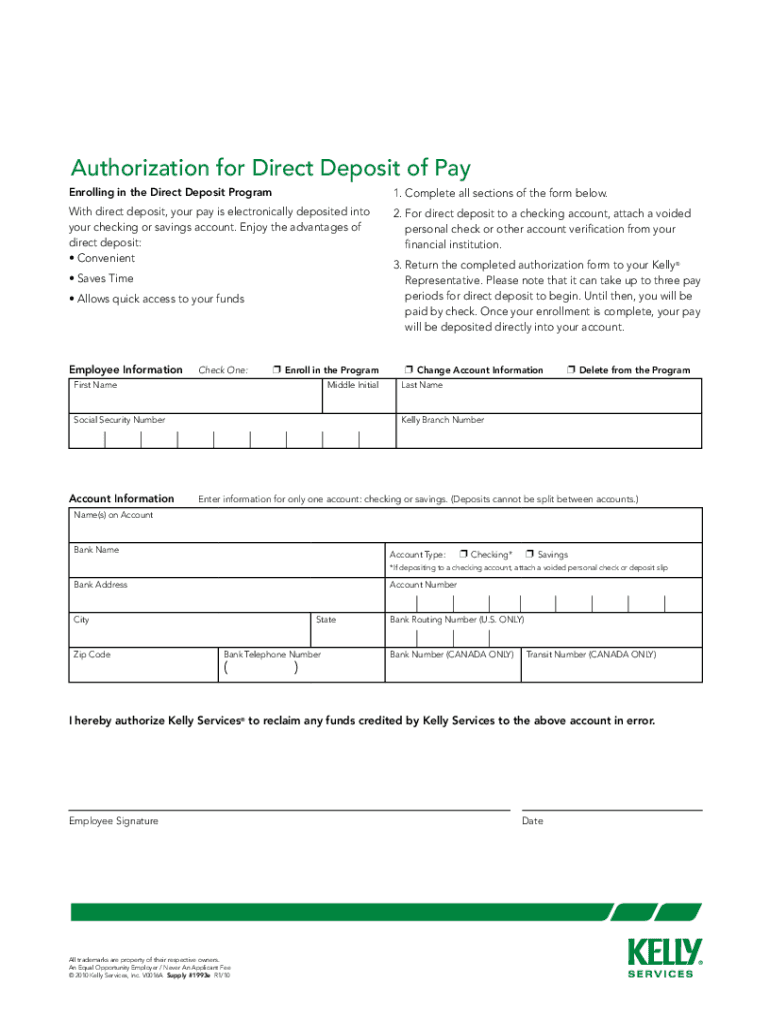
Electronic Pay Options We offer either direct deposit or payroll card. To enroll in Direct Deposit, complete the Authorization for Direct Deposit of Pay. To enroll in the payroll card, complete the.
Loading

Open form follow the instructions

Easily sign the form with your finger

Send filled & signed form or save
How to fill out the Kelly Services Direct Deposit online
Completing the Kelly Services Direct Deposit authorization form is an essential step in ensuring your pay is deposited directly into your chosen bank account. This guide will provide clear, step-by-step instructions for filling out the form to make the process as straightforward as possible.
Follow the steps to complete the Direct Deposit form successfully.
- Press the ‘Get Form’ button to access the authorization form and open it in your preferred editing platform.
- Begin by selecting an option under 'Employee Information' to indicate whether you are enrolling in the program, changing account information, or deleting from the program. Mark the appropriate box.
- Fill in your first name, middle initial, and last name in the designated fields. Ensure your personal information is accurate.
- Enter your Social Security Number in the appropriate field, ensuring that it is correct to avoid any issues.
- Locate and enter the Kelly Branch Number in the specified section to identify your association with Kelly Services.
- In the 'Account Information' section, choose to enter details for either a checking or savings account. Remember, deposits cannot be split between accounts.
- Provide the name(s) on the account, followed by the name of the bank. Ensure that you enter the correct bank name to prevent errors in direct deposit.
- Select the account type by marking 'Checking' or 'Savings.' If you selected checking, attach a voided personal check or deposit slip to verify the account.
- Enter the bank address, including the city, state, and zip code.
- Complete your account number and bank routing number (U.S. only) accurately to ensure successful fund transfers.
- If applicable, enter your bank telephone number. If you are providing Canadian account details, fill in the bank number and transit number as required.
- Sign and date the form to authorize Kelly Services to reclaim any funds credited to your account in error.
- Once you have filled out the entire form, review your entries for accuracy. Then, save any changes and choose to download, print, or share the form as needed.
Take the next step in your employment journey by completing the Kelly Services Direct Deposit form online today.
Experience a faster way to fill out and sign forms on the web. Access the most extensive library of templates available.
Related content
Direct deposit instructions are tied to a mail code. Existing Mail Codes New Mail Codes If...
For my convenience, I request thal Kelly & Associates Financial Services, Inc. directly...
The temporary services market includes competitors of all sizes, including several, such...
Get answers to your most pressing questions about US Legal Forms API.
How to set up direct deposit?
Setting up a Kelly Services Direct Deposit requires you to provide your bank account details to your employer. Typically, this involves filling out a direct deposit form where you should include your account number and routing number. Once submitted, follow up with your HR to ensure it’s activated correctly.
How long do direct bank deposits take?
Direct bank deposits usually take one to two business days to process and become available in your account. This duration might vary depending on your bank. If you're waiting longer than expected, contacting your bank can help clarify any delays.
How to set up direct deposit on Paychex?
To set up Kelly Services Direct Deposit on Paychex, log into your Paychex account and navigate to the direct deposit section. Follow the prompts to enter your banking information and confirm your selections. If you encounter difficulties, refer to Paychex support for step-by-step guidance.
Is a direct deposit available immediately?
Kelly Services Direct Deposits are not typically available immediately. Most standard processing times take one to two business days before funds are accessible in your account. This allows banks to verify and clear the deposit efficiently.
Why has my direct deposit not hit yet?
There are several reasons your Kelly Services Direct Deposit may not have been received. Issues may arise from incorrect banking information, holidays, or bank delays. To resolve this, double-check your account details and contact your employer or bank for support.
How long does it take for a bank to get a direct deposit?
A bank generally processes direct deposits within one to two business days after receiving the payment information. Factors such as weekends, holidays, and bank processing times can influence the exact duration. If you have questions, reaching out to your bank may provide clarity.
How long does it take to get a direct deposit?
Typically, Kelly Services Direct Deposits are processed within one to two business days. However, this may vary based on your bank’s policies or payment schedule. It is best to confirm with your employer for specific timelines related to your direct deposit.
How do I check the status of a direct deposit?
To check the status of your Kelly Services Direct Deposit, log into your payroll account or contact your bank. Most banks provide online access where you can view recent transactions, including direct deposits. If you need more assistance, reach out to your HR department for detailed information.
How do I set up direct deposit for payroll?
To set up direct deposit for payroll, request a direct deposit form from your employer, fill it out with your bank details, and submit it promptly. Ensure you choose Kelly Services Direct Deposit to streamline your payment process. It's a convenient way to receive your salary directly into your bank account without any hassle.
How to get direct deposit details?
To get direct deposit details, you should contact your employer or the payroll department, as they manage these records. If you utilize Kelly Services Direct Deposit, your details will also be available through your bank account documents. Regularly check your account and ensure all information is up-to-date to avoid any disruptions.
Use professional pre-built templates to fill in and sign documents online faster. Get access to thousands of forms.
If you believe that this page should be taken down, please follow our DMCA take down process here.