
Open form follow the instructions

Easily sign the form with your finger

Send filled & signed form or save
How to fill out the Household Goods Descriptive Inventory online
The Household Goods Descriptive Inventory is a crucial form that outlines the items being transported during a move. This guide will help you navigate the process of filling out this document online, ensuring accuracy and completeness.
Follow the steps to complete the Household Goods Descriptive Inventory online.
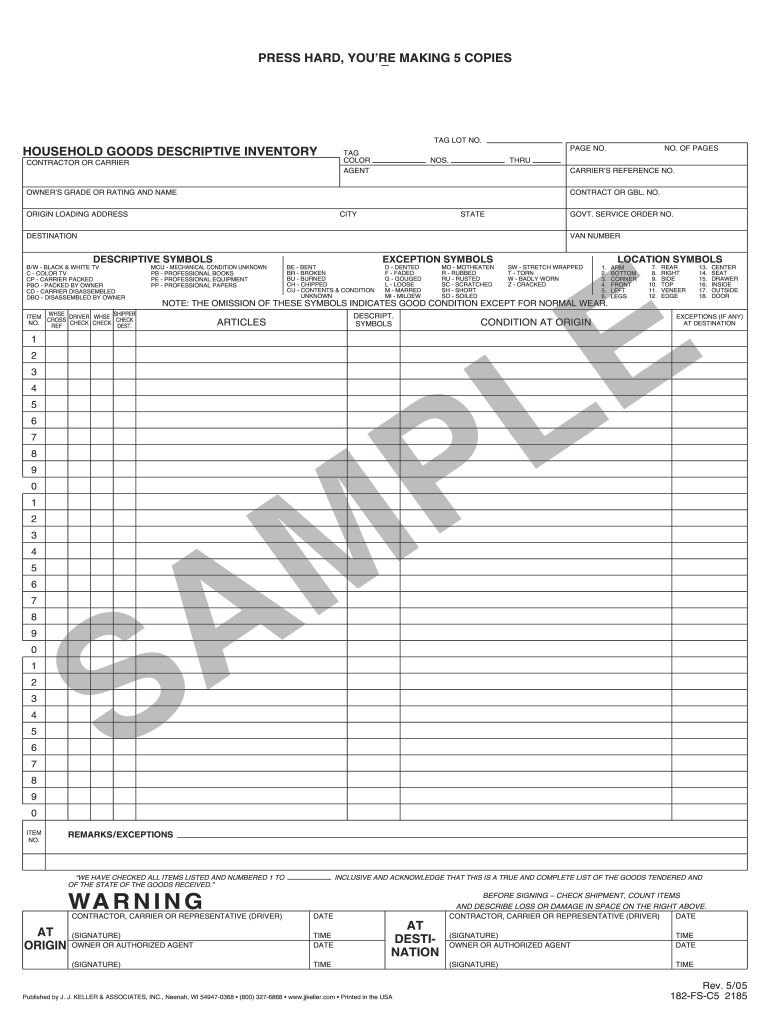
- To begin, press the ‘Get Form’ button to access the Household Goods Descriptive Inventory form. This action will open the document for you to fill out.
- Fill out the contractor or carrier information. Provide the necessary details such as the name and contact information of the responsible party handling your move.
- Next, enter the owner's grade or rating along with their name. This section is essential for identifying the individual responsible for the inventory.
- Input the origin loading address, including city and state. This information indicates where the goods are being picked up.
- Specify the destination of the items. Clearly write the new address where the goods will be delivered.
- Use the descriptive symbols section to indicate the condition of each item. Reference the list of symbols provided on the form, marking them appropriately to describe the state of items being moved.
- Document any exceptions to the condition of the goods. Use the exception symbols to denote any known damage or issues, ensuring transparency during the move.
- Proceed to list all articles in the designated area, ensuring each item is captured with its corresponding condition at origin and any exceptions noted at destination.
- Check your entries thoroughly. Make sure that each item is accounted for and that no details are missing.
- Finalize your submission by saving your changes. You may download, print, or share the completed form as needed.
Take action now and complete your Household Goods Descriptive Inventory online to ensure a smooth moving process.
Experience a faster way to fill out and sign forms on the web. Access the most extensive library of templates available.
Related content
Aug 25, 2022 — • Descriptive Inventory and “bingo cards” for overflow containers...
Since the Household Goods Descriptive Inventory becomes the “manifest,” and is the...
by AP Guideline · 2007 — household activities (cooking/cleaning), and consumer products...
Get answers to your most pressing questions about US Legal Forms API.
How to do a household inventory list?
To create a household inventory list, first select a method that suits you, whether it be a digital document or a handwritten list. Move through each space methodically, documenting items along the way, including photos for visual reference. Ensure you include every significant item, as this comprehensive household goods descriptive inventory will support you in various situations, such as insurance documentation and moving logistics.
How do you write a house inventory?
Writing a house inventory requires a systematic approach. Begin by listing rooms and their corresponding items, ensuring to capture the essence of each item. Accurate details, such as serial numbers and estimated values, enhance the reliability of the inventory. To streamline this process, consider using tools or templates available on USLegalForms, which can provide structure and clarity.
What is a household goods descriptive inventory?
A household goods descriptive inventory is a thorough catalog of all items within a residence. It includes detailed descriptions, values, and conditions of personal belongings. This inventory serves crucial purposes, such as facilitating insurance claims or assisting in relocation. Creating this detailed list helps you maintain an organized record of your possessions.
What is the inventory of household goods form?
The inventory of household goods form is a document that compiles a comprehensive list of personal possessions. This form typically includes sections for item descriptions, values, and conditions. It's essential for both insurance claims and moving logistics. Utilizing USLegalForms, you can access standardized templates to ensure thoroughness and compliance.
How do you write inventory of your personal belongings?
To write an effective inventory of your personal belongings, focus on clarity and completeness. Start with a room-by-room approach, listing items such as artwork or kitchenware. Don't forget to note serial numbers and model details where applicable. This organized household goods descriptive inventory will help secure your possessions in case of loss or theft.
How do I make an inventory list for my home?
To create a household goods descriptive inventory list, start by listing all the rooms in your home. Go through each room and document your belongings, including furniture, appliances, and personal items. Group similar items together, and be as detailed as possible to ensure accuracy. Using a checklist or template from a reliable platform like USLegalForms can simplify this process and ensure you don’t miss anything.
What's included in household goods?
Household goods typically encompass all items present in a residence, including furniture, appliances, electronics, and personal items. These goods are crucial for day-to-day living and must be accounted for in a comprehensive inventory. A detailed Household Goods Descriptive Inventory ensures that you know exactly what you own, helping during relocations or insurance assessments.
What is a household item?
A household item includes any personal possession used within the home environment. Examples range from furniture and appliances to decorative pieces and clothing. Understanding what constitutes a household item helps in creating an organized Household Goods Descriptive Inventory that accurately captures the essence of your belongings.
What is a household inventory?
A household inventory refers to a complete record of all personal items within a residence. This inventory typically includes detailed descriptions of items, their conditions, and estimated values. Having a household inventory, especially a Household Goods Descriptive Inventory, is valuable for managing your possessions and can simplify tasks like insurance claims or moving.
What is a household good descriptive inventory?
A household goods descriptive inventory is a comprehensive list of items in your home, detailing their conditions and values. This document serves multiple purposes, including facilitating insurance claims and organizing your belongings for moving. By maintaining a well-prepared Household Goods Descriptive Inventory, you ensure that nothing gets overlooked during relocations or emergencies.
Use professional pre-built templates to fill in and sign documents online faster. Get access to thousands of forms.
If you believe that this page should be taken down, please follow our DMCA take down process here.