We use cookies to improve security, personalize the user experience, enhance our marketing activities (including cooperating with our marketing partners) and for other business use.
Click "here" to read our Cookie Policy. By clicking "Accept" you agree to the use of cookies. Read less
Read more
Accept
Loading
Form preview
  • US Legal Forms
  • Form Library
  • More Forms
  • More Multi-State Forms
  • Loan Review: Review, React, Remediate

Get Loan Review: Review, React, Remediate

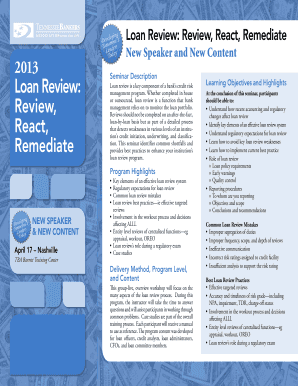
Bank s credit risk management program. Whether completed in house or outsourced, loan review is a function that bank management relies on to monitor the loan portfolio. Reviews should not be completed on an after-the-fact, loan-by-loan basis but as part of a detailed process that detects weaknesses in various levels of an institution s credit initiation, underwriting, and classification. This seminar identifies common shortfalls and provides best practices to enhance your institution s loa.

How it works

  1. Open form

    Open form follow the instructions

  2. Easily sign form

    Easily sign the form with your finger

  3. Share form

    Send filled & signed form or save

How to fill out and sign Loan Review: Review, React, Remediate online?

Get your online template and fill it in using progressive features. Enjoy smart fillable fields and interactivity.Follow the simple instructions below:

Business, tax, legal along with other e-documents require a high level of protection and compliance with the legislation. Our documents are updated on a regular basis in accordance with the latest amendments in legislation. In addition, with us, all of the info you provide in the Loan Review: Review, React, Remediate is protected against loss or damage through industry-leading encryption.

The tips below will help you fill in Loan Review: Review, React, Remediate easily and quickly:

  1. Open the document in the full-fledged online editing tool by clicking Get form.
  2. Complete the requested boxes which are marked in yellow.
  3. Hit the arrow with the inscription Next to move from field to field.
  4. Go to the e-autograph solution to e-sign the template.
  5. Add the date.
  6. Check the entire document to make sure you haven?t skipped anything important.
  7. Click Done and save your new document.

Our service allows you to take the entire process of completing legal forms online. For that reason, you save hours (if not days or even weeks) and eliminate extra expenses. From now on, fill out Loan Review: Review, React, Remediate from your home, workplace, or even on the move.

Tips on how to fill out, edit and sign Loan Review: Review, React, Remediate online

How to fill out and sign Loan Review: Review, React, Remediate online?

Get your online template and fill it in using progressive features. Enjoy smart fillable fields and interactivity.Follow the simple instructions below:

Business, tax, legal along with other e-documents require a high level of protection and compliance with the legislation. Our documents are updated on a regular basis in accordance with the latest amendments in legislation. In addition, with us, all of the info you provide in the Loan Review: Review, React, Remediate is protected against loss or damage through industry-leading encryption.

The tips below will help you fill in Loan Review: Review, React, Remediate easily and quickly:

  1. Open the document in the full-fledged online editing tool by clicking Get form.
  2. Complete the requested boxes which are marked in yellow.
  3. Hit the arrow with the inscription Next to move from field to field.
  4. Go to the e-autograph solution to e-sign the template.
  5. Add the date.
  6. Check the entire document to make sure you haven?t skipped anything important.
  7. Click Done and save your new document.

Our service allows you to take the entire process of completing legal forms online. For that reason, you save hours (if not days or even weeks) and eliminate extra expenses. From now on, fill out Loan Review: Review, React, Remediate from your home, workplace, or even on the move.

How to edit Loan Review: Review, React, Remediate: customize forms online

Have your stressless and paper-free way of editing Loan Review: Review, React, Remediate. Use our trusted online option and save a lot of time.

Drafting every document, including Loan Review: Review, React, Remediate, from scratch requires too much effort, so having a tried-and-true platform of pre-uploaded document templates can do wonders for your productivity.

But editing them can be problem, especially when it comes to the documents in PDF format. Fortunately, our huge catalog comes with a built-in editor that allows you to quickly fill out and customize Loan Review: Review, React, Remediate without leaving our website so that you don't need to waste hours modifying your forms. Here's what to do with your form utilizing our solution:

  • Step 1. Find the needed document on our website.
  • Step 2. Click Get Form to open it in the editor.
  • Step 3. Use our specialized editing tools that allow you to insert, remove, annotate and highlight or blackout text.
  • Step 4. Create and add a legally-binding signature to your form by using the sign option from the top toolbar.
  • Step 5. If the document layout doesn’t look the way you want it, utilize the tools on the right to remove, add, and re-order pages.
  • step 6. Add fillable fields so other persons can be invited to fill out the document (if applicable).
  • Step 7. Pass around or send out the document, print it out, or select the format in which you’d like to get the document.

Whether you need to complete editable Loan Review: Review, React, Remediate or any other document available in our catalog, you’re well on your way with our online document editor. It's easy and safe and doesn’t require you to have particular skills. Our web-based solution is set up to handle practical everything you can think of concerning document editing and execution.

Forget about the conventional way of handling your forms. Choose a more efficient solution to help you simplify your activities and make them less reliant on paper.

Get form

Experience a faster way to fill out and sign forms on the web. Access the most extensive library of templates available.
Get form

Related content

Credit Risk Grading Systems: Observations from a...
This article is drawn from examiner observations about the loan risk grading systems at...
Learn more
Trust in Banks and Borrower Behavior: Evidence...
by S Chang · 2025 — Trust in banks significantly influences borrower decisions. Local...
Learn more
Green Remediation Best Management Practices
The ASTM Standard. Guide for Greener Cleanups (E2893-13)2 offers a collection of greener...
Learn more

Related links form

OPNAVINST 12430.3 GSA Form GSA 3615 U.S. TREAS Form Treas-irs-8818-2002 NAVSEA-1995-86

Questions & Answers

Get answers to your most pressing questions about US Legal Forms API.

Contact support

The duration of loan reviews can vary based on several factors, but they typically take a few days to a couple of weeks. Elements such as the complexity of the loan, the lender’s workload, and the thoroughness of submitted documentation can influence the timeline. Therefore, it is essential to prepare all necessary information for a smoother review. With tools from uslegalforms, you can expedite your loan review: review, react, remediate efficiently.

The loan review process entails a structured examination of loan documentation and borrower qualifications. This includes reviewing credit history, income verification, and any potential risks associated with the loan. It serves to protect both lenders and borrowers by ensuring transparency and compliance. Utilizing uslegalforms can streamline this process, allowing for efficient loan review: review, react, remediate.

The four stages in the loan process are application, underwriting, approval, and funding. Each stage plays a significant role in determining whether you receive the loan and under what terms. Understanding these stages through a Loan Review: Review, React, Remediate can empower you to navigate the process more effectively.

The duration for a loan review can vary depending on the complexity of the application and the lender's processes. Typically, it can take anywhere from a few days to several weeks. Engaging in a Loan Review: Review, React, Remediate with a streamlined platform, such as USLegalForms, can expedite this process.

Remediation on a bank statement refers to the actions taken to correct any discrepancies or issues that may arise. It involves reviewing transactions, identifying errors, and making necessary adjustments to ensure accuracy. In the context of a Loan Review: Review, React, Remediate, this process is crucial for maintaining financial integrity.

The loan review process involves assessing the borrower's application, verifying financial information, and analyzing creditworthiness. It includes a thorough examination of documents, financial statements, and compliance with lending guidelines. By engaging in a detailed loan review, you enhance the likelihood of approval and favorable terms. Utilizing the Loan Review: Review, React, Remediate approach ensures a comprehensive evaluation.

The 5 Cs of strategic analysis consist of Company, Customers, Competitors, Collaborators, and Context. This framework helps you evaluate your business environment and make informed strategic decisions. By analyzing these components, you can identify opportunities and threats in your industry. This strategic insight can be valuable during the Loan Review: Review, React, Remediate process.

The 5 pillars of credit analysis include Payment History, Credit Utilization, Length of Credit History, New Credit, and Types of Credit Used. These elements form the foundation of your credit profile and influence your credit score. A comprehensive understanding of these pillars allows you to make informed decisions regarding your credit management. In the Loan Review: Review, React, Remediate process, assessing these pillars is essential.

The 5 Cs used to determine creditworthiness are Character, Capacity, Capital, Collateral, and Conditions. These factors collectively provide lenders with insight into your financial reliability and risk level. By addressing each C in your application, you strengthen your position and enhance your credibility. The Loan Review: Review, React, Remediate framework helps you navigate this evaluation effectively.

Capacity is the key component that indicates whether you can afford a loan. It assesses your income, existing debt, and overall financial obligations. By demonstrating a strong capacity, you can reassure lenders of your ability to manage loan repayments. This aspect is crucial in the Loan Review: Review, React, Remediate process to secure favorable terms.

Get This Form Now!

Use professional pre-built templates to fill in and sign documents online faster. Get access to thousands of forms.
Get form
If you believe that this page should be taken down, please follow our DMCA take down processhere.

Industry-leading security and compliance

US Legal Forms protects your data by complying with industry-specific security standards.
  • In businnes since 1997
    25+ years providing professional legal documents.
  • Accredited business
    Guarantees that a business meets BBB accreditation standards in the US and Canada.
  • Secured by Braintree
    Validated Level 1 PCI DSS compliant payment gateway that accepts most major credit and debit card brands from across the globe.
Get Loan Review: Review, React, Remediate
Get form
Form Packages
Adoption
Bankruptcy
Contractors
Divorce
Home Sales
Employment
Identity Theft
Incorporation
Landlord Tenant
Living Trust
Name Change
Personal Planning
Small Business
Wills & Estates
Packages A-Z
Form Categories
Affidavits
Bankruptcy
Bill of Sale
Corporate - LLC
Divorce
Employment
Identity Theft
Internet Technology
Landlord Tenant
Living Wills
Name Change
Power of Attorney
Real Estate
Small Estates
Wills
All Forms
Forms A-Z
Form Library
Customer Service
Terms of Service
Privacy Notice
Legal Hub
Content Takedown Policy
Bug Bounty Program
About Us
Blog
Affiliates
Contact Us
Delete My Account
Site Map
Industries
Forms in Spanish
Localized Forms
State-specific Forms
Forms Kit
Legal Guides
Real Estate Handbook
All Guides
Prepared for You
Notarize
Incorporation services
Our Customers
For Consumers
For Small Business
For Attorneys
Our Sites
US Legal Forms
USLegal
FormsPass
pdfFiller
signNow
airSlate WorkFlow
DocHub
Instapage
Social Media
Call us now toll free:
+1 833 426 79 33
As seen in:
  • USA Today logo picture
  • CBC News logo picture
  • LA Times logo picture
  • The Washington Post logo picture
  • AP logo picture
  • Forbes logo picture
© Copyright 1997-2025
airSlate Legal Forms, Inc.
3720 Flowood Dr, Flowood, Mississippi 39232
Form Packages
Adoption
Bankruptcy
Contractors
Divorce
Home Sales
Employment
Identity Theft
Incorporation
Landlord Tenant
Living Trust
Name Change
Personal Planning
Small Business
Wills & Estates
Packages A-Z
Form Categories
Affidavits
Bankruptcy
Bill of Sale
Corporate - LLC
Divorce
Employment
Identity Theft
Internet Technology
Landlord Tenant
Living Wills
Name Change
Power of Attorney
Real Estate
Small Estates
Wills
All Forms
Forms A-Z
Form Library
Customer Service
Terms of Service
Privacy Notice
Legal Hub
Content Takedown Policy
Bug Bounty Program
About Us
Blog
Affiliates
Contact Us
Delete My Account
Site Map
Industries
Forms in Spanish
Localized Forms
State-specific Forms
Forms Kit
Legal Guides
Real Estate Handbook
All Guides
Prepared for You
Notarize
Incorporation services
Our Customers
For Consumers
For Small Business
For Attorneys
Our Sites
US Legal Forms
USLegal
FormsPass
pdfFiller
signNow
airSlate WorkFlow
DocHub
Instapage
Social Media
Call us now toll free:
+1 833 426 79 33
As seen in:
  • USA Today logo picture
  • CBC News logo picture
  • LA Times logo picture
  • The Washington Post logo picture
  • AP logo picture
  • Forbes logo picture
© Copyright 1997-2025
airSlate Legal Forms, Inc.
3720 Flowood Dr, Flowood, Mississippi 39232