We use cookies to improve security, personalize the user experience, enhance our marketing activities (including cooperating with our marketing partners) and for other business use.
Click "here" to read our Cookie Policy. By clicking "Accept" you agree to the use of cookies. Read less
Read more
Accept
Loading
Form preview
  • US Legal Forms
  • Form Library
  • More Forms
  • More Multi-State Forms
  • Activities And Employment History - Valuemd

Get Activities And Employment History - Valuemd

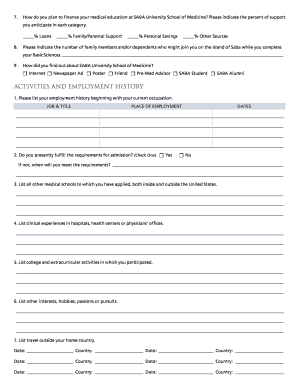
Ntal Support % Personal Savings % Other Sources Please indicate the number of family members and/or dependents who might join you on the island of Saba while you complete your Basic Sciences. 9 . How did you find out about SABA University School of Medicine? Internet Newspaper Ad Poster Friend Pre-Med Advisor SABA Student SABA Alumni ACTIVITIES AND EMPL.

How it works

  1. Open form

    Open form follow the instructions

  2. Easily sign form

    Easily sign the form with your finger

  3. Share form

    Send filled & signed form or save

How to fill out and sign ACTIVITIES AND EMPLOYMENT HISTORY - ValueMD online?

Get your online template and fill it in using progressive features. Enjoy smart fillable fields and interactivity.Follow the simple instructions below:

Are you still searching for a quick and practical solution to fill out ACTIVITIES AND EMPLOYMENT HISTORY - ValueMD at a reasonable price? Our service gives you a wide variety of templates that are available for filling in on the internet. It only takes a few minutes.

Keep to these simple actions to get ACTIVITIES AND EMPLOYMENT HISTORY - ValueMD completely ready for submitting:

  1. Get the form you will need in our collection of legal forms.
  2. Open the template in our online editing tool.
  3. Read through the recommendations to determine which details you have to provide.
  4. Click the fillable fields and add the required info.
  5. Put the date and insert your e-autograph as soon as you complete all other boxes.
  6. Look at the completed form for misprints as well as other mistakes. In case you need to change something, our online editor along with its wide range of tools are at your disposal.
  7. Save the filled out document to your computer by hitting Done.
  8. Send the electronic form to the intended recipient.

Filling out ACTIVITIES AND EMPLOYMENT HISTORY - ValueMD doesn?t have to be perplexing anymore. From now on easily cope with it from your home or at the office straight from your mobile device or personal computer.

Tips on how to fill out, edit and sign ACTIVITIES AND EMPLOYMENT HISTORY - ValueMD online

How to fill out and sign ACTIVITIES AND EMPLOYMENT HISTORY - ValueMD online?

Get your online template and fill it in using progressive features. Enjoy smart fillable fields and interactivity.Follow the simple instructions below:

Are you still searching for a quick and practical solution to fill out ACTIVITIES AND EMPLOYMENT HISTORY - ValueMD at a reasonable price? Our service gives you a wide variety of templates that are available for filling in on the internet. It only takes a few minutes.

Keep to these simple actions to get ACTIVITIES AND EMPLOYMENT HISTORY - ValueMD completely ready for submitting:

  1. Get the form you will need in our collection of legal forms.
  2. Open the template in our online editing tool.
  3. Read through the recommendations to determine which details you have to provide.
  4. Click the fillable fields and add the required info.
  5. Put the date and insert your e-autograph as soon as you complete all other boxes.
  6. Look at the completed form for misprints as well as other mistakes. In case you need to change something, our online editor along with its wide range of tools are at your disposal.
  7. Save the filled out document to your computer by hitting Done.
  8. Send the electronic form to the intended recipient.

Filling out ACTIVITIES AND EMPLOYMENT HISTORY - ValueMD doesn?t have to be perplexing anymore. From now on easily cope with it from your home or at the office straight from your mobile device or personal computer.

How to edit ACTIVITIES AND EMPLOYMENT HISTORY - ValueMD: customize forms online

Your easily editable and customizable ACTIVITIES AND EMPLOYMENT HISTORY - ValueMD template is within reach. Make the most of our collection with a built-in online editor.

Do you put off completing ACTIVITIES AND EMPLOYMENT HISTORY - ValueMD because you simply don't know where to start and how to move forward? We understand your feelings and have a great solution for you that has nothing nothing to do with fighting your procrastination!

Our online catalog of ready-to-use templates allows you to search through and select from thousands of fillable forms tailored for a variety of use cases and scenarios. But getting the file is just scratching the surface. We offer you all the needed tools to complete, sign, and edit the document of your choice without leaving our website.

All you need to do is to open the document in the editor. Check the verbiage of ACTIVITIES AND EMPLOYMENT HISTORY - ValueMD and confirm whether it's what you’re searching for. Begin modifying the template by using the annotation tools to give your form a more organized and neater look.

  • Add checkmarks, circles, arrows and lines.
  • Highlight, blackout, and fix the existing text.
  • If the document is meant for other people too, you can add fillable fields and share them for other parties to complete.
  • As soon as you’re done modifying the template, you can download the document in any available format or select any sharing or delivery options.

Summing up, along with ACTIVITIES AND EMPLOYMENT HISTORY - ValueMD, you'll get:

  • A robust suite of editing} and annotation tools.
  • A built-in legally-binding eSignature functionality.
  • The option to create forms from scratch or based on the pre-uploaded template.
  • Compatibility with various platforms and devices for greater convenience.
  • Numerous options for safeguarding your documents.
  • An array of delivery options for more frictionless sharing and sending out files.
  • Compliance with eSignature frameworks regulating the use of eSignature in online transactions.

With our professional tool, your completed forms are always officially binding and entirely encrypted. We guarantee to shield your most delicate info.

Get what is needed to make a professional-looking ACTIVITIES AND EMPLOYMENT HISTORY - ValueMD. Make the right choice and attempt our program now!

Get form

Experience a faster way to fill out and sign forms on the web. Access the most extensive library of templates available.
Get form

Related content

Appendix B – TREx XML Schema
And Full-Time Employment With Sufficient Self-Help Skills To Maintain. Employment Without...
Learn more
Three Essays on Job-Trainee and Employee Behavior
detailed information about employment history than typically available, and measure actual...
Learn more

Related links form

Banquet Event Contract Template Basement Renovation Contract Template Beat Maker Contract Template Between Two Entities Contract Template

Questions & Answers

Get answers to your most pressing questions about US Legal Forms API.

Contact support

You should not leave your employment history blank on your application. Providing a detailed employment history, even if it includes gaps or less relevant positions, shows your career progression and experience. The ACTIVITIES AND EMPLOYMENT HISTORY - ValueMD platform can help you present your history in the best light, ensuring you demonstrate your qualifications effectively.

When writing your employment history, start with the most recent job and work backward. Clearly outline each job title, the company name, dates you worked there, and a brief overview of your key responsibilities. Using the resources provided by ACTIVITIES AND EMPLOYMENT HISTORY - ValueMD can guide you in crafting a comprehensive employment history that appeals to employers.

Adding your employment history is straightforward on the ACTIVITIES AND EMPLOYMENT HISTORY - ValueMD platform. Just access the employment history section and fill in your job details as prompted. This efficient method ensures all your relevant work experience is captured accurately.

To add your work history, navigate to the relevant section of the ACTIVITIES AND EMPLOYMENT HISTORY - ValueMD platform. You can input your previous job titles, companies, and dates directly into the provided fields. This user-friendly approach simplifies the process and helps maintain an organized overview of your career.

To effectively answer your employment history, start by listing your past jobs in reverse chronological order. Include the company name, job title, dates of employment, and a brief description of your responsibilities. Consider using the platform, ACTIVITIES AND EMPLOYMENT HISTORY - ValueMD, to streamline this process and ensure you present the most accurate information.

Yes, medical schools actively consider extracurricular activities as part of the evaluation process. Engaging in clubs, volunteering in health-related organizations, or conducting research can enhance your application significantly. These activities are a crucial part of your ACTIVITIES AND EMPLOYMENT HISTORY - ValueMD, illustrating your commitment to medicine.

A most meaningful experience often involves a significant event or role that highlights your skills, dedication, and resourcefulness. For instance, volunteering at a community health fair can showcase your commitment to health services and your ability to engage with diverse populations. These experiences reflect your ACTIVITIES AND EMPLOYMENT HISTORY - ValueMD, which medical schools value.

When writing your TMDSAS activity description, focus on using concise language while clearly outlining your responsibilities and achievements. Begin with a strong action verb and provide specific examples of your contributions. This approach will enhance your ACTIVITIES AND EMPLOYMENT HISTORY - ValueMD and present a robust profile to program evaluators.

In total, AMCAS allows applicants to report up to 15 work and activities. This includes volunteer roles, clinical experiences, and research. It is important to narrow down your entries to those that best represent your skills and commitments in your ACTIVITIES AND EMPLOYMENT HISTORY - ValueMD.

Medical assistants perform a variety of tasks that include both clinical and administrative duties. They help with patient intake, assist physicians with examinations, and manage patient records. As you document these roles in your ACTIVITIES AND EMPLOYMENT HISTORY - ValueMD, be sure to emphasize how these experiences prepared you for a future in healthcare.

Get This Form Now!

Use professional pre-built templates to fill in and sign documents online faster. Get access to thousands of forms.
Get form
If you believe that this page should be taken down, please follow our DMCA take down processhere.

Industry-leading security and compliance

US Legal Forms protects your data by complying with industry-specific security standards.
  • In businnes since 1997
    25+ years providing professional legal documents.
  • Accredited business
    Guarantees that a business meets BBB accreditation standards in the US and Canada.
  • Secured by Braintree
    Validated Level 1 PCI DSS compliant payment gateway that accepts most major credit and debit card brands from across the globe.
Get ACTIVITIES AND EMPLOYMENT HISTORY - ValueMD
Get form
Form Packages
Adoption
Bankruptcy
Contractors
Divorce
Home Sales
Employment
Identity Theft
Incorporation
Landlord Tenant
Living Trust
Name Change
Personal Planning
Small Business
Wills & Estates
Packages A-Z
Form Categories
Affidavits
Bankruptcy
Bill of Sale
Corporate - LLC
Divorce
Employment
Identity Theft
Internet Technology
Landlord Tenant
Living Wills
Name Change
Power of Attorney
Real Estate
Small Estates
Wills
All Forms
Forms A-Z
Form Library
Customer Service
Terms of Service
Privacy Notice
Legal Hub
Content Takedown Policy
Bug Bounty Program
About Us
Blog
Affiliates
Contact Us
Delete My Account
Site Map
Industries
Forms in Spanish
Localized Forms
State-specific Forms
Forms Kit
Legal Guides
Real Estate Handbook
All Guides
Prepared for You
Notarize
Incorporation services
Our Customers
For Consumers
For Small Business
For Attorneys
Our Sites
US Legal Forms
USLegal
FormsPass
pdfFiller
signNow
airSlate WorkFlow
DocHub
Instapage
Social Media
Call us now toll free:
+1 833 426 79 33
As seen in:
  • USA Today logo picture
  • CBC News logo picture
  • LA Times logo picture
  • The Washington Post logo picture
  • AP logo picture
  • Forbes logo picture
© Copyright 1997-2025
airSlate Legal Forms, Inc.
3720 Flowood Dr, Flowood, Mississippi 39232
Form Packages
Adoption
Bankruptcy
Contractors
Divorce
Home Sales
Employment
Identity Theft
Incorporation
Landlord Tenant
Living Trust
Name Change
Personal Planning
Small Business
Wills & Estates
Packages A-Z
Form Categories
Affidavits
Bankruptcy
Bill of Sale
Corporate - LLC
Divorce
Employment
Identity Theft
Internet Technology
Landlord Tenant
Living Wills
Name Change
Power of Attorney
Real Estate
Small Estates
Wills
All Forms
Forms A-Z
Form Library
Customer Service
Terms of Service
Privacy Notice
Legal Hub
Content Takedown Policy
Bug Bounty Program
About Us
Blog
Affiliates
Contact Us
Delete My Account
Site Map
Industries
Forms in Spanish
Localized Forms
State-specific Forms
Forms Kit
Legal Guides
Real Estate Handbook
All Guides
Prepared for You
Notarize
Incorporation services
Our Customers
For Consumers
For Small Business
For Attorneys
Our Sites
US Legal Forms
USLegal
FormsPass
pdfFiller
signNow
airSlate WorkFlow
DocHub
Instapage
Social Media
Call us now toll free:
+1 833 426 79 33
As seen in:
  • USA Today logo picture
  • CBC News logo picture
  • LA Times logo picture
  • The Washington Post logo picture
  • AP logo picture
  • Forbes logo picture
© Copyright 1997-2025
airSlate Legal Forms, Inc.
3720 Flowood Dr, Flowood, Mississippi 39232