Loading
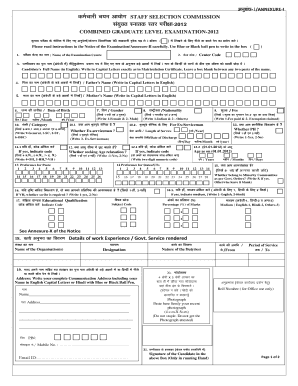
Get - /annexure-i B E S S X + M Staff Selection Commission B Di X I B E I F -2012 Combined Graduate
How it works
-

Open form follow the instructions
-

Easily sign the form with your finger
-

Send filled & signed form or save
How to fill out the - /ANNEXURE-I B E S S X + M STAFF SELECTION COMMISSION B Di X I B E I F -2012 COMBINED GRADUATE online
This guide provides clear, step-by-step instructions on how to complete the - /ANNEXURE-I B E S S X + M STAFF SELECTION COMMISSION B Di X I B E I F -2012 COMBINED GRADUATE form online. By following these guidelines, users can ensure accurate and efficient submission.
Follow the steps to complete the form effectively.
- Click ‘Get Form’ button to obtain the form and open it for editing.
- Begin filling in your personal information. Start with your candidate’s full name, written in capital letters exactly as it appears on your matriculation certificate. Leave a box blank between any two parts of the name.
- Provide your father’s name in capital letters in English.
- Enter your mother’s name, also in capital letters in English.
- Input your date of birth by selecting the day, month, and year appropriately.
- Indicate your gender by writing '1' for female or '2' for male.
- Select your category by writing '9' for general, '1' for SC, '2' for ST, or '6' for OBC.
- If you are an ex-serviceman, indicate your length of service and the date of discharge. If applicable, answer whether seeking age relaxation.
- Fill in your educational qualifications using the provided codes.
- Specify your preferences for states or union territories.
- Indicate if you have paid the fee or claimed an exemption.
- Complete details regarding your work experience or government service, including organization names and positions held.
- Provide your complete communication address, including city and postal code.
- Affix your recent photograph firmly in the designated area.
- Read and sign the declaration section, ensuring all information is accurate to avoid disqualification.
- Finally, save your changes, and you have the option to download, print, or share the completed form.
Complete your form online today to ensure a smooth submission process.
Industry-leading security and compliance
US Legal Forms protects your data by complying with industry-specific security standards.
-
In businnes since 199725+ years providing professional legal documents.
-
Accredited businessGuarantees that a business meets BBB accreditation standards in the US and Canada.
-
Secured by BraintreeValidated Level 1 PCI DSS compliant payment gateway that accepts most major credit and debit card brands from across the globe.