Loading
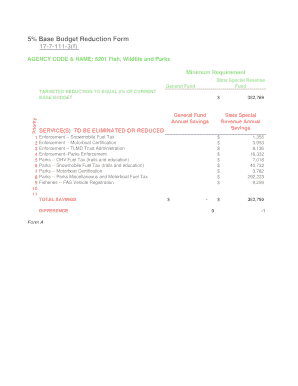
Get 5% Base Budget Reduction Form 17-7-111-3(f) - Leg.mt.gov - Leg Mt
How it works
-

Open form follow the instructions
-

Easily sign the form with your finger
-

Send filled & signed form or save
How to fill out the 5% Base Budget Reduction Form 17-7-111-3(f) - Leg.mt.gov - Leg Mt online
Filling out the 5% Base Budget Reduction Form is an important process for agencies aiming to submit budget reductions effectively. This guide provides clear, step-by-step instructions to assist users in completing the form accurately and efficiently online.
Follow the steps to successfully complete the budget reduction form.
- Click ‘Get Form’ button to obtain the form and open it in the editor.
- Locate the 'Agency Code & Name' section at the top of the form. Enter the code '5201' and the name 'Fish, Wildlife and Parks' in the designated fields.
- Proceed to the 'Minimum Requirement' section. Indicate the relevant budget categories under 'State Special Revenue Fund' and 'General Fund' as necessary.
- In the 'Targeted Reduction to Equal 5% of Current Base Budget' section, fill in the required details for each line item. This includes entering the corresponding dollar amounts for each proposed reduction.
- For the fields concerning 'Services to be Eliminated or Reduced', provide a detailed description of each service. Be concise yet informative.
- In the section titled 'The Savings that are Expected', ensure you state the anticipated savings associated with each service reduction.
- Next, assess the impacts of the proposed elimination or reduction in the 'Consequences or Impacts of the Proposed Elimination or Reduction' fields. Be specific about the potential consequences.
- Describe how the impact on constituents and staff might be mitigated in the designated section. This is important for demonstrating a thoughtful approach to the proposed changes.
- Finally, confirm whether the service is specifically required by state and/or federal statute in the 'Whether the Service is Specifically Required by State &/or Federal Statute' section, selecting 'Yes' or 'No' as appropriate.
- Once all the sections are filled out, review the entire form for accuracy. After confirming that all information is correct, you can save changes, download, print, or share the form as needed.
Complete the 5% Base Budget Reduction Form online today!
Industry-leading security and compliance
US Legal Forms protects your data by complying with industry-specific security standards.
-
In businnes since 199725+ years providing professional legal documents.
-
Accredited businessGuarantees that a business meets BBB accreditation standards in the US and Canada.
-
Secured by BraintreeValidated Level 1 PCI DSS compliant payment gateway that accepts most major credit and debit card brands from across the globe.