Loading
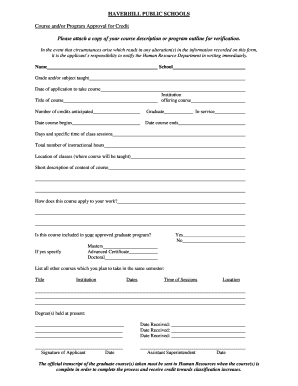
Get Course Approval Form - Haverhill Public Schools - Haverhill-ps
How it works
-

Open form follow the instructions
-

Easily sign the form with your finger
-

Send filled & signed form or save
How to fill out the Course Approval Form - Haverhill Public Schools - Haverhill-ps online
Filling out the Course Approval Form is essential for educators wishing to receive credit for their professional development. This guide provides clear, step-by-step instructions to help users complete the form accurately and efficiently.
Follow the steps to successfully complete the Course Approval Form.
- Press the ‘Get Form’ button to access the Course Approval Form - Haverhill Public Schools online. This will allow you to open the form in the appropriate editor.
- Begin by entering your name in the designated field. This identifies you as the applicant filling out the form.
- Next, specify your school and the grade and/or subject that you teach. This information helps to contextualize your application.
- Indicate the date of your application for the course along with the name of the institution offering the course.
- Fill in the title of the course you are applying for and the number of credits you anticipate earning upon completion.
- Select whether the course is a graduate course or an in-service course, and provide the relevant dates when the course begins and ends.
- List the specific days and times that the class will be held, along with the total number of instructional hours anticipated.
- Provide the location of the classes where the course will be taught.
- Write a short description of the content of the course. This summary should explain the key topics and focus of the course.
- Answer the question regarding how this course applies to your work. This section should illustrate the practical relevance of the course to your position.
- Indicate whether this course is included in your approved graduate program and specify if applicable - Masters, Advanced Certificate, or Doctoral.
- If you answered 'yes' to the previous question, please provide additional details regarding your approved program.
- List all other courses you plan to take during the same semester, including the title, institution, dates, times of sessions, and locations for each.
- Next, provide information about your currently held degrees, including the dates received for each.
- Complete the form by signing and dating it in the applicant signature section. Ensure that the Assistant Superintendent also signs and dates the form.
- Once you have filled out the form entirely, you can save your changes, download, print, or share the form as needed.
Begin filling out your Course Approval Form online today for a seamless application experience.
Poverty & Diversity 10.8% of the population for whom poverty status is determined in Haverhill, MA (7.13k out of 66.1k people) live below the poverty line, a number that is lower than the national average of 12.6%.
Industry-leading security and compliance
US Legal Forms protects your data by complying with industry-specific security standards.
-
In businnes since 199725+ years providing professional legal documents.
-
Accredited businessGuarantees that a business meets BBB accreditation standards in the US and Canada.
-
Secured by BraintreeValidated Level 1 PCI DSS compliant payment gateway that accepts most major credit and debit card brands from across the globe.