Loading
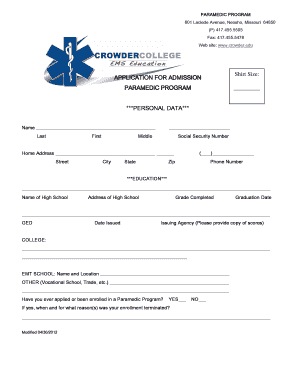
Get Application For Admission Paramedic ... - Crowder College - Crowder
How it works
-

Open form follow the instructions
-

Easily sign the form with your finger
-

Send filled & signed form or save
How to fill out the APPLICATION FOR ADMISSION PARAMEDIC - Crowder College - Crowder online
This guide provides a comprehensive overview of how to complete the Application for Admission Paramedic at Crowder College. It is designed to help you navigate each section of the form with clarity and support.
Follow the steps to complete your application successfully.
- Press the ‘Get Form’ button to access the application form electronically and open it in your preferred editor.
- Begin with the personal data section. Enter your last name, first name, middle name, social security number, home address, city, state, zip code, and phone number accurately.
- In the education section, detail your high school name and address, grade completed, and graduation date. If applicable, provide GED information, including date issued and issuing agency.
- Provide details about your college and EMT school, including the name and location. Additionally, list any other educational institutions you have attended.
- Indicate whether you have previously applied or been enrolled in a Paramedic Program. If yes, include the reasons for termination of enrollment.
- Under the employment section, list your most current employer first, including their address, phone number, position held, dates of employment, and reasons for leaving. Repeat this for up to two additional employers.
- Specify whether references can be contacted from your previous and present employers.
- Provide information for three references who can vouch for your work record. Include their names, addresses, phone numbers, and occupations.
- In the supplemental data section, share your motivations for becoming a Paramedic, how you learned about the program, and your future plans after graduation. Additionally, list any awards or recognitions you have received in the past five years.
- Complete the emergency services section by answering any required questions related to criminal convictions or licensure actions.
- Read and sign the statement confirming that the information provided is accurate. Include the date of your signature.
- Make sure to review all entered information for accuracy. After finalizing your application, you can save changes, download, print, or share the completed form.
Start your application process online by completing the necessary forms today.
What are the steps in the college application process? Create a list of colleges you're interested in. Research and visit schools to narrow down the list. Fill out the FAFSA®, and consider finances and scholarship opportunities. Get letters of recommendations, if required. Take college admission tests.
Industry-leading security and compliance
US Legal Forms protects your data by complying with industry-specific security standards.
-
In businnes since 199725+ years providing professional legal documents.
-
Accredited businessGuarantees that a business meets BBB accreditation standards in the US and Canada.
-
Secured by BraintreeValidated Level 1 PCI DSS compliant payment gateway that accepts most major credit and debit card brands from across the globe.