We use cookies to improve security, personalize the user experience, enhance our marketing activities (including cooperating with our marketing partners) and for other business use.
Click "here" to read our Cookie Policy. By clicking "Accept" you agree to the use of cookies. Read less
Read more
Accept
Loading
Form preview
  • US Legal Forms
  • Form Library
  • More Forms
  • More Uncategorized Forms
  • Section 112 Terms Of Settlement - Ontario

Get Section 112 Terms Of Settlement - Ontario

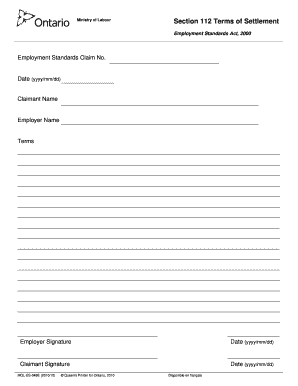
Ministry of Labour Section 112 Terms of Settlement Employment Standards Act, 2000 Clear Form Employment Standards Claim No. Date (yyyy/mm/dd) Claimant Name Employer Name Terms Employer Signature Date.

How it works

  1. Open form

    Open form follow the instructions

  2. Easily sign form

    Easily sign the form with your finger

  3. Share form

    Send filled & signed form or save

How to fill out the Section 112 Terms Of Settlement - Ontario online

Completing the Section 112 Terms Of Settlement form is an essential step for both claimants and employers following a resolution of an employment standards claim in Ontario. This guide provides clear, step-by-step instructions to help you successfully navigate the form online.

Follow the steps to complete your Terms Of Settlement form efficiently.

  1. Begin by locating the ‘Get Form’ button to access the Section 112 Terms Of Settlement document. Press the button to obtain the form, and it will open in your desired editing tool.
  2. In the first field, enter your Employment Standards Claim number, which is critical for identifying your specific claim.
  3. Enter the date of filling out the form in the format of year, month, and day (yyyy/mm/dd). This is important for maintaining a clear timeline of events.
  4. Provide the name of the claimant in the designated field. This should be the individual or entity asserting the claim.
  5. Next, enter the employer's name in the appropriate field. This identifies the party involved in the claim.
  6. Outline the terms agreed upon by both parties in the 'Terms' section. Be clear and concise to avoid any misunderstandings.
  7. Both the employer and claimant are required to provide their signatures. Each party must sign and date the form at the indicated sections. Use the same date format (yyyy/mm/dd).
  8. After filling out all fields accurately, review the form to ensure all information is correct. This helps prevent errors that could cause delays.
  9. Finally, you may save your changes, download the completed form, print it for records, or share it as needed with the involved parties.

Ensure your documents are complete and submit your forms online today to maintain compliance with employment standards.

Get form

Experience a faster way to fill out and sign forms on the web. Access the most extensive library of templates available.
Get form

Related content

Revision of December 2000 Regulatory ... - Federal...
Mar 29, 2005 — Interpreting the term “necessary” in section 112(n)(1)(A), EPA found...
Learn more
Class Actions in Canada - Global Class Actions...
Ontario Law Reform Commission, Report on Class Actions, vol. ... One area where certain...
Learn more
Kingston, Ontario - Wikipedia
Kingston is a city in Eastern Ontario, Canada. It is on the eastern end of Lake Ontario...
Learn more

Related links form

Sample OSHA Safety Manual - Jian International Distribution Agreement - Jian Finder S Fee Agreement - Business Sale - Jian Employee Stock Bonus Plan & Agreement - Jian

Questions & Answers

Get answers to your most pressing questions about US Legal Forms API.

Contact support

Paper. The paper you choose for your bookmark should be quite thick, but not as heavy as card: between 150 and 250 gsm is perfect. The finish is also important – if you opt for recycled or natural paper there's no need for additional finishes, but coated paper may be even more effective with lamination added.

The most common dimensions for Bookmarks are 2” x 6”, 2” x 7”, and 2” x 8 “.

Bookmark template sizes can come either in 2.5 x 7.5 inches or in 2 x 5 inches. There are also bookmarks which have equal sizes on each side resulting in a square marker while there are others which form different shapes ranging from dogs to faces resulting in an uneven template size.

A bookmark should be: 5-8 cm wide. 12-21 cm long.

Final thickness of a bookmark is about 1/32 inch.

What's the standard bookmark size? Common and popular sizes for bookmarks are 2”W x 6”L and 2”W x 8”L.

Standard sizes for bookmarks are for example 74x210 mm and 98x210 mm.

Bookmark Sizes for Print When printing an actual bookmark if you are using an A4 sheet of paper sized 8.3″ × 11.7″ can fit a bookmark with the size of 6 × 2 in.

Get This Form Now!

Use professional pre-built templates to fill in and sign documents online faster. Get access to thousands of forms.
Get form
If you believe that this page should be taken down, please follow our DMCA take down processhere.

Industry-leading security and compliance

US Legal Forms protects your data by complying with industry-specific security standards.
  • In businnes since 1997
    25+ years providing professional legal documents.
  • Accredited business
    Guarantees that a business meets BBB accreditation standards in the US and Canada.
  • Secured by Braintree
    Validated Level 1 PCI DSS compliant payment gateway that accepts most major credit and debit card brands from across the globe.
Get Section 112 Terms Of Settlement - Ontario
Get form
Form Packages
Adoption
Bankruptcy
Contractors
Divorce
Home Sales
Employment
Identity Theft
Incorporation
Landlord Tenant
Living Trust
Name Change
Personal Planning
Small Business
Wills & Estates
Packages A-Z
Form Categories
Affidavits
Bankruptcy
Bill of Sale
Corporate - LLC
Divorce
Employment
Identity Theft
Internet Technology
Landlord Tenant
Living Wills
Name Change
Power of Attorney
Real Estate
Small Estates
Wills
All Forms
Forms A-Z
Form Library
Customer Service
Terms of Service
Privacy Notice
Legal Hub
Content Takedown Policy
Bug Bounty Program
About Us
Help Portal
Legal Resources
Blog
Affiliates
Contact Us
Delete My Account
Site Map
Industries
Forms in Spanish
Localized Forms
State-specific Forms
Forms Kit
Legal Guides
Real Estate Handbook
All Guides
Prepared for You
Notarize
Incorporation services
Our Customers
For Consumers
For Small Business
For Attorneys
Our Sites
US Legal Forms
USLegal
FormsPass
pdfFiller
signNow
airSlate WorkFlow
DocHub
Instapage
Social Media
Call us now toll free:
+1 833 426 79 33
As seen in:
  • USA Today logo picture
  • CBC News logo picture
  • LA Times logo picture
  • The Washington Post logo picture
  • AP logo picture
  • Forbes logo picture
© Copyright 1997-2025
airSlate Legal Forms, Inc.
3720 Flowood Dr, Flowood, Mississippi 39232
Form Packages
Adoption
Bankruptcy
Contractors
Divorce
Home Sales
Employment
Identity Theft
Incorporation
Landlord Tenant
Living Trust
Name Change
Personal Planning
Small Business
Wills & Estates
Packages A-Z
Form Categories
Affidavits
Bankruptcy
Bill of Sale
Corporate - LLC
Divorce
Employment
Identity Theft
Internet Technology
Landlord Tenant
Living Wills
Name Change
Power of Attorney
Real Estate
Small Estates
Wills
All Forms
Forms A-Z
Form Library
Customer Service
Terms of Service
Privacy Notice
Legal Hub
Content Takedown Policy
Bug Bounty Program
About Us
Help Portal
Legal Resources
Blog
Affiliates
Contact Us
Delete My Account
Site Map
Industries
Forms in Spanish
Localized Forms
State-specific Forms
Forms Kit
Legal Guides
Real Estate Handbook
All Guides
Prepared for You
Notarize
Incorporation services
Our Customers
For Consumers
For Small Business
For Attorneys
Our Sites
US Legal Forms
USLegal
FormsPass
pdfFiller
signNow
airSlate WorkFlow
DocHub
Instapage
Social Media
Call us now toll free:
+1 833 426 79 33
As seen in:
  • USA Today logo picture
  • CBC News logo picture
  • LA Times logo picture
  • The Washington Post logo picture
  • AP logo picture
  • Forbes logo picture
© Copyright 1997-2025
airSlate Legal Forms, Inc.
3720 Flowood Dr, Flowood, Mississippi 39232