Loading
Get Liquor Sales Reporting Form - City Of Marietta, Ga - Mariettaga
How it works
-

Open form follow the instructions
-

Easily sign the form with your finger
-

Send filled & signed form or save
How to use or fill out the Liquor Sales Reporting Form - City Of Marietta, GA - Mariettaga online
Completing the Liquor Sales Reporting Form is essential for businesses operating in the liquor industry within the City of Marietta, Georgia. This guide provides clear, step-by-step instructions to help users navigate the form effectively online.
Follow the steps to successfully complete the Liquor Sales Reporting Form.
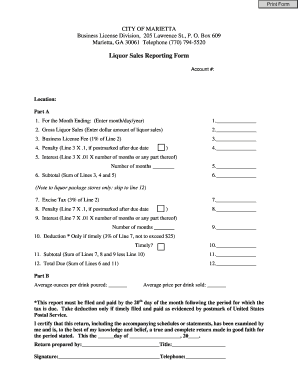
- Press the ‘Get Form’ button to access the form and open it in your digital editor.
- In the 'Account #' field, enter your business's designated account number.
- For the 'Location' section, provide the address where your liquor business is registered.
- In 'Part A', first fill in the date for the 'Month Ending' by entering the appropriate month, day, and year.
- Next, record the total 'Gross Liquor Sales' in the designated field, reflecting the dollar amount representative of your sales.
- Calculate the 'Business License Fee', which is 1% of your 'Gross Liquor Sales', and enter this amount in the corresponding line.
- If applicable, determine the 'Penalty', which is 10% of the 'Business License Fee' if your form is postmarked after the due date.
- Next, calculate the 'Interest' using the value from the 'Business License Fee' multiplied by 0.01 for each month or part thereof since the due date.
- Add the calculated 'Business License Fee', 'Penalty', and 'Interest' to get the 'Subtotal' and record this amount.
- Skip the next lines if you are a liquor package store. If not, calculate the 'Excise Tax', which is 3% of your 'Gross Liquor Sales'.
- Like before, assess any applicable penalties and interest related to the 'Excise Tax' for late submissions.
- If you qualify, enter any deductions on 'Line 10', noting that it only applies if you have filed on time.
- Once all amounts have been properly filled in, calculate the 'Total Due' by summing 'Subtotal' and the 'Excise Tax' and record it.
- In 'Part B', input the average ounces per drink poured and average price per drink sold.
- Finally, certify your return by completing the declaration, entering the date, preparer's name, title, signature, and telephone number.
- After completing the form, you may save your changes, download, print, or share the document as needed.
Ensure your liquor sales reporting is accurate and timely by completing the form online today.
What is the sales tax rate for the 30084 ZIP Code? The estimated 2023 sales tax rate for 30084 is 8%.