Loading
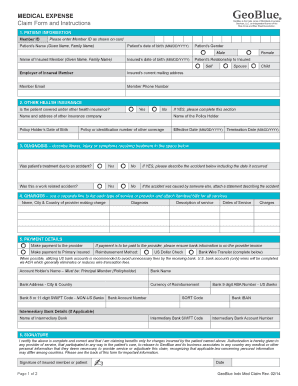
Get V10012 Geoblue Medical Expense Claim Form - Concordia Plan - Concordiaplans
How it works
-

Open form follow the instructions
-

Easily sign the form with your finger
-

Send filled & signed form or save
How to use or fill out the V10012 GeoBlue Medical Expense Claim Form - Concordia Plan - Concordiaplans online
Filling out the V10012 GeoBlue Medical Expense Claim Form can ensure you receive the reimbursements you need for medical services. This guide provides step-by-step instructions to help you accurately complete the form online.
Follow the steps to successfully complete your medical expense claim form.
- Click ‘Get Form’ button to obtain the form and open it in the editor.
- Begin by filling out the patient information section. Include the member ID, patient's name, date of birth, and gender. Also, provide details about the insured member including their name, date of birth, relationship to the patient, employer, and contact details.
- In the other health insurance section, indicate if the patient is covered under any other health insurance. If yes, provide the details of the other insurance policy.
- Complete the diagnosis section by describing the illness, injury, or symptoms requiring treatment. Specify if the treatment was due to an accident and, if so, describe the accident in detail.
- List the charges in the charges section. Use a separate line for each service type and attach itemized bills. Include provider details, diagnosis, description of service, dates of service, and the associated charges.
- Move to the payment details section. Choose how the payment should be made, either to the provider or to the primary insured. If opting for bank wire transfer, provide the necessary bank information as outlined.
- Finally, sign the form to certify that the information is accurate and complete. Include the date when signing.
- Review the completed form to ensure all fields are filled accurately. Save changes, download, print, or share the form as needed.
Complete your GeoBlue medical expense claim form online today for fast processing and reimbursement.
To fill out an expense reimbursement form, such as the V10012 GeoBlue Medical Expense Claim Form - Concordia Plan - Concordiaplans, begin by entering all required personal details. Clearly list each expense, along with its supporting documents, to enhance the clarity of your claim. A complete and accurate submission will help expedite your reimbursement process.
Industry-leading security and compliance
US Legal Forms protects your data by complying with industry-specific security standards.
-
In businnes since 199725+ years providing professional legal documents.
-
Accredited businessGuarantees that a business meets BBB accreditation standards in the US and Canada.
-
Secured by BraintreeValidated Level 1 PCI DSS compliant payment gateway that accepts most major credit and debit card brands from across the globe.